Session 9: Robot Story Time – Bringing Stories to Life with Simple Coding
Session Architect: Muhammad Bilal
Session Length: (50-60 minutes)
Equipment Required:
- M3D Robotics kit.
- Laptops with Scratch pre-installed.
- Paper and pencils for students to plan their story.
- Classroom objects (blocks, toys, etc.) to create small props or “worlds” for their story.
Learning Objectives:
- Use basic movement and display blocks (Move Forward, Turn Left/Right, Show Text, Express) to bring a simple story to life.
- Practice planning and coding a sequence of events based on their story.
- Encourage creativity and teamwork through storytelling with their robot.
Resources:
Scratch Code File:
Grade 1 Session 9.sb3 (3.4 MB)
1. Introduction to Storytelling with Robots (10 minutes)
Activity:
Introduce the idea that today, their robots will act out stories just like characters in a book or movie! Explain that they will plan a short, fun story and then use their robot to bring it to life using the blocks they already know.
Instructions:
Start by connecting this activity to their everyday experiences:
“Have you ever watched a movie or listened to a story where the characters go on adventures or solve problems? Well, today, your robot is going to be the star of its very own story! You get to be the writer and the director, telling your robot what to do using the code blocks we’ve already learned.”
You can ask them questions like:
“What if your robot was a superhero? What kind of adventure would it go on?”
“What if your robot was playing hide and seek with its friends? How would it move around to find them?”
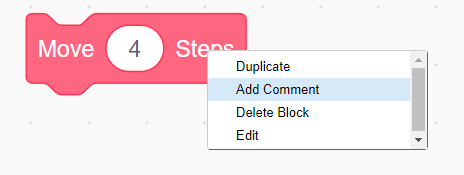
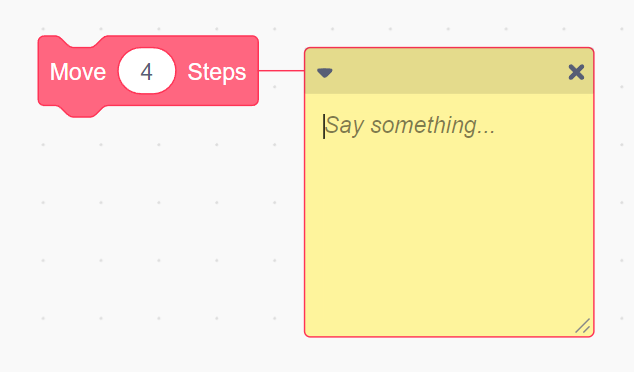
Then, introduce the “Comment” feature, explaining how it can help them remember what each block in their story does:
“Remember last time, when we had to fix mistakes in the code? We saw little comments next to some blocks to explain what they did. Today, you can write your own comments to remind you of what each part of your story is doing!”
-
Encourage them to write in the comment box and let them play around with this feature.
-
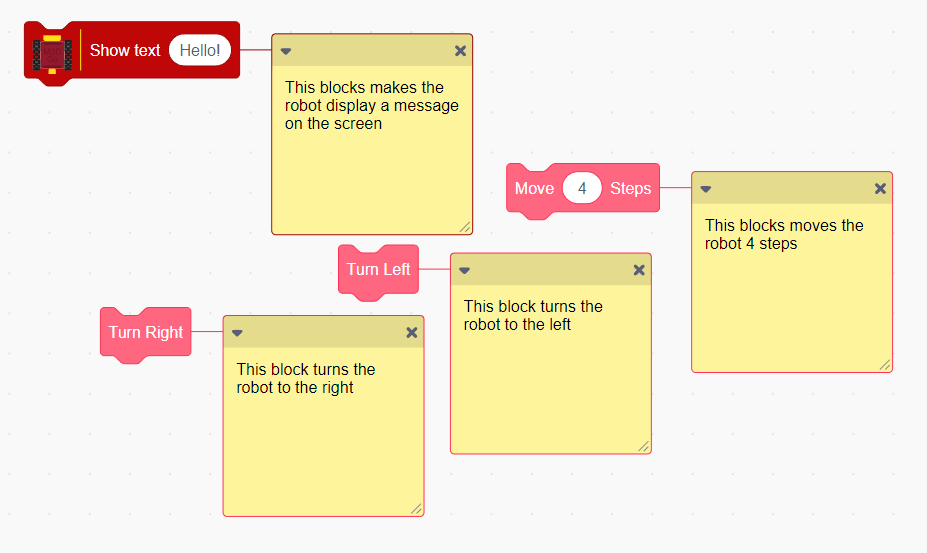
You may ask them to write the use of the blocks that they have used so far:
2. Story Planning and Commenting (15 minutes)
Activity:
Students will work in pairs or small groups to brainstorm a short story that features their robot. Their robot will move, show emotions, and “talk” using the blocks they’ve already learned.
Instructions:
Provide a simple story template to help guide them. They should include:
- Beginning: Where does the robot start, and what is its goal?
- Middle: What does the robot do along the way?
- End: How does the robot complete its goal?
Give them examples they can relate to:
“What if your robot was on a treasure hunt and had to find hidden objects?”
“What if your robot was visiting the zoo and meeting different animals?”
Encourage them to add comments next to their blocks to describe what the robot is doing at each point in the story. For example, they might write a comment saying “This block makes the robot turn left to find the treasure.”
Teacher’s Role:
- Help students with their story ideas by asking fun, creative questions.
- Encourage them to think about how their robot can move and “talk” to bring the story to life.
- Show them how to add comments to their blocks to keep track of what each one does.
3. Coding the Robot’s Actions (20 minutes)
Activity:
Students will use Scratch to program the robot to act out their story. They’ll focus on simple actions like moving forward, turning, and displaying text or emojis to bring their robot’s “character” to life.
Instructions:
- Ask students to start coding the first action in their story. For example:
- Move Forward to start the journey.
- Turn Left or Right to avoid an obstacle.
- Display text like “I’m on my way!” or an emoji using the “Express” block.
“Let’s start with your robot’s first move. What does it need to do first in your story? Maybe it needs to move forward to begin the adventure. Then, you can add a text block to show what the robot is thinking or feeling—like saying ‘Let’s go!’ or ‘I’m excited!’.”
- Encourage them to test their code step by step, making sure the robot follows their story as planned.
Teacher’s Role:
- Walk around the room, helping students with their coding and offering suggestions for how to bring their stories to life.
- Encourage them to use “Show Text” and “Express” blocks to make the robot “talk” and “feel.”
4. Sharing the Stories (10 minutes)
Activity:
After finishing their code, each group will present their robot’s story to the class. They’ll let the robot act out the sequence they’ve programmed, showing how it moves and communicates.
Instructions:
- Each group takes turns presenting their robot’s story, explaining what’s happening as the robot moves, turns, and displays text or emotions.
“Now it’s time for our robots to show us their stories! Let’s see what adventures they’ve been on and how they move around their world.”
- Encourage students to cheer for each other’s robots and celebrate the different creative stories.
Teacher’s Role:
- Facilitate the sharing time, making sure each group has a chance to present.
- Encourage positive feedback and make it fun by celebrating the robot’s “performances.”
5. Reflection and Wrap-Up (5 minutes)
Activity:
Wrap up by reflecting on what the students enjoyed most about telling a story with their robot.
Reflection Questions:
- “What was the most fun part of telling your robot’s story?”
- “Was it easy or hard to make your robot move and ‘talk’?”
- “If you could add something to your story, what would it be?”
Teacher’s Role:
- Lead the reflection and celebrate the students’ creativity and teamwork.
- Highlight how they used the simple blocks they’ve learned in previous sessions to bring robots and their stories to life.
Learning Outcome:
By the end of the session, students will have created and coded a simple story using basic Scratch blocks. They will have practiced combining movement, text, and expressions to bring their robot’s actions to life, while also developing their teamwork and problem-solving skills.