Session 5: Learning Loops – Repeating Actions with Code
Session Architect: Muhammad Bilal
Duration: 50-60 minutes
Equipment Required:
- M3D Robotics kit.
- Laptops with Scratch pre-installed.
- Paper and pencils for students to note down patterns or ideas.
- A small area for the robots to move.
Learning Objectives:
- Understand the basic concept of loops and how they simplify repetitive tasks.
- Learn to use simple loops like “Repeat _ Times” and “Repeat Forever.”
- Explore advanced loop types like “Repeat Until” and nested loops.
- Program the robot to move in loop-based patterns, experimenting with different configurations.
Resources:
Scratch code for the session: Grade 4 Session 5.sb3
1. Introduction to Loops with Real-Life Examples (5 minutes)
Activity:
Introduce the concept of loops using everyday activities to explain how repeating actions are part of daily life. Connect this to coding loops, where a robot can repeat tasks without needing new instructions each time.
Instructions:
- You might say:
“Have you ever noticed that some things in life repeat? Like when you brush your teeth every morning or tie your shoes the same way every time? These are called loops in coding—actions that happen again and again without you having to think about them.”
You may have physical loop structures like a ring or a hoop, or you may create some complex loops with a piece of string. Show students how a loop comes back to where it started and then repeats so that they understand why we call these repetitive tasks “loops”.
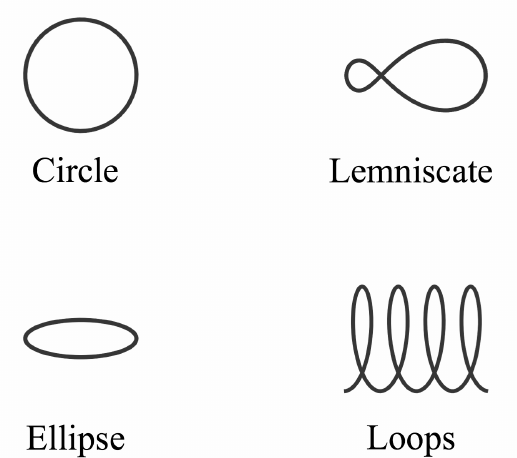
- Ask students to think of something they do every day:
“What’s something you do every day? Can you think of something that repeats over and over again?”
- Explain that coding loops are like this. Instead of writing the same instructions over and over, we can tell the robot to repeat an action as many times as we want using loops:
“Today, we’re going to learn how to make our robot repeat actions, just like brushing your teeth or tying your shoes!”
Teacher’s Role:
- Guide students through understanding loops by connecting the concept to their daily routines.
- Use simple and relatable examples to explain how loops work in both life and coding.
2. Basic Loops: Repeat _ Times and Repeat Forever (15 minutes)
Activity:
Students will start by learning the basics of loops. They will use “Repeat _ Times” and “Repeat Forever” to make the robot perform simple tasks like moving forward, turning, or spinning.
Instructions:
- Introduce the “Repeat _ Times” block and explain how it works. You may have a Scratch editor running on a projector screen where you can show students the these coding blocks.
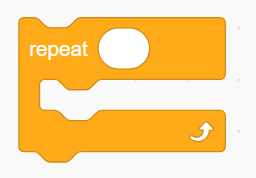
“This block tells the robot to repeat something a certain number of times. If you want the robot to move forward three times, you can use this block.”
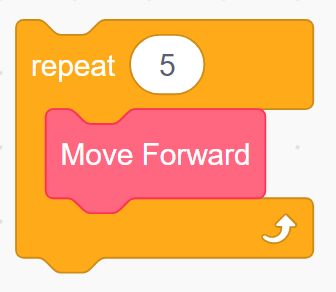
- Demonstrate how to use the block by attaching a Move Forward action inside the loop and testing it:
“Let’s see what happens when we tell the robot to move forward 5 times.”
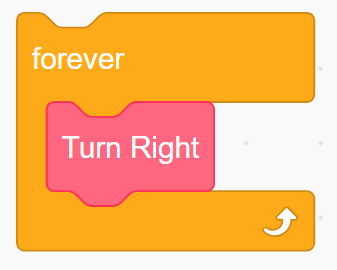
- Next, introduce the “Repeat Forever” block, explaining that it makes the robot do something over and over until we tell it to stop:
“This block keeps going forever! The robot will keep doing what we tell it until we tell it to stop.”
Such as, this block will make the robot turn forever in the right direction like the hand of a clock.
Or, you could give example how if the the students want the robot to turn around, they can use the loop to repeat the action twice instead of repeating the same block.
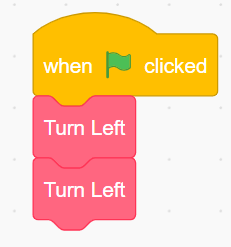
This can be written with loops as:
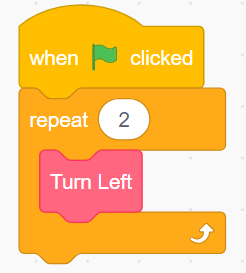
- Let students experiment with these two types of loops by programming simple actions like moving forward and turning.
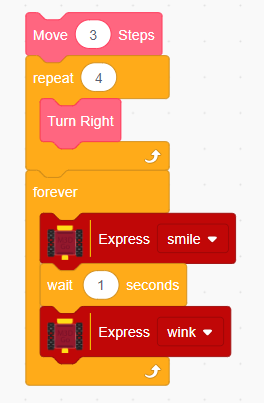
- Encourage them to use previously learnt concepts like “Wait _ Seconds” along with movement blocks and Express block to create different repeated patterns. One such example could be:
Teacher’s Role:
- Assist students in understanding how to use Repeat _ Times and Repeat Forever to repeat actions in their code.
- Encourage them to experiment with different numbers in the loops to see how the robot’s behavior changes.
3. Loop-Based Movement Patterns (15 minutes)
Activity:
Students will now use loops to program the robot to create fun movement patterns, like spirals or repeating shapes. They will experiment with different loop configurations to see how it affects the robot’s path. The purpose here is that the students get comfortable with loop structures and try different combinations.
Instructions:
- You can say:
“Now let’s use loops to make our robot move in cool patterns! We can use loops to make it move in circles, zig-zags etc.”
-
Guide students in combining movement blocks like Move Forward, Turn Left, and loops to create patterns.
-
Encourage them to experiment with different loop configurations:
“What happens if you use a loop inside another loop? Or if you tell the robot to move in a spiral using a loop?”
Teacher’s Role:
- Encourage students to experiment with different loop combinations and create unique movement patterns.
- Help them troubleshoot any issues with their loops and guide them in making adjustments to their code.
4. Exploring Advanced Loops: Repeat Until and Nested Loops (15 minutes)
Activity:
Once students are comfortable with basic loops, introduce advanced loops like “Repeat Until” and nested loops. Explain how these loops allow for more complex control of the robot’s actions.
Instructions:
- Introduce the “Repeat Until” loop:
Demonstrate by programming the robot to move forward using the “Repeat Until” block and stop when it detects something in front using the distance sensor.
“This loop tells the robot to keep doing something until a certain condition is met. We used conditions in the last lecture remember? Just like we asked our robot to do some tasks based on those conditions, now we are going to ask it to repeat certain actions based on certain conditions. For example, we can tell the robot to keep moving forward until it sees an obstacle in front of it.”
The code will look something like:
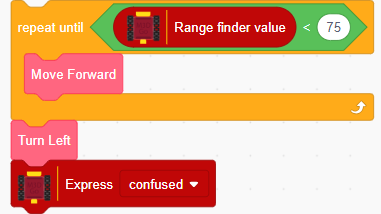
Explain how this code works:
- The robot will keep moving forward until the value on the range finder becomes larger than 75, which means that there is an obstacle ahead.
- Once the value exceeds 75, the robot will turn left and
- Introduce Nested loops:
“We can also put one loop inside another. This is called a nested loop. It’s like telling the robot to do something many times, and each time it repeats, it does something else inside that loop.”
- Let students experiment with using “Repeat Until” to create more complex movements for the robot.
Encourage students to use variables as well as condition blocks to create complex blocks where multiple patterns can be created using a single button. One example of such code is:
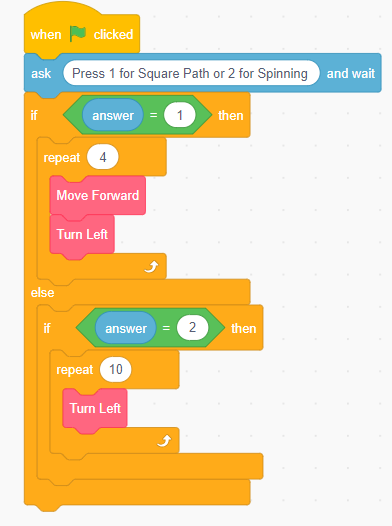
The code makes the robot move in different patterns based on different input.
Teacher’s Role:
- Help students understand how to use Repeat Until to make the robot perform actions based on conditions.
- Assist them in creating nested loops and encourage them to test and refine their code.
5. Reflection and Wrap-Up (5 minutes)
Activity:
Gather students together to reflect on their experience with loops. Let them share what they learned and how their robot moved with different loops.
Reflection Questions:
- “What was the most fun part about using loops to control your robot?”
- “Did the loops make coding easier or harder? Why?”
- “What pattern did you create with your loops?”
- How were your previous concepts helpful in loops?
Teacher’s Role:
- Lead the reflection discussion and encourage students to think about how loops can simplify coding.
- Celebrate their achievements and encourage them to continue experimenting with loops in future sessions.
Learning Outcome:
By the end of the session, students will have learned the basics of loops and how they can simplify repetitive tasks in coding. They will have experimented with basic and advanced loops to create movement patterns and understand how loops can control the robot’s behavior in different ways.