Session Plan: Introduction to Loops and Advanced Robot Movements
Session Architect: Muhammad Bilal
Duration: 50-60 minutes
Equipment Required:
- M3D Robotics kit (including M3D Go and its display attachment)
- Laptops with Scratch pre-installed
- Paper and pencils for students to document their discoveries and ideas
- Markers or objects for marking areas for robot movement (optional)
Learning Objectives:
- Understand the concept of loops in Scratch to simplify repetitive actions.
- Explore and use different types of loops: “Repeat _ Times” and “Repeat Forever.”
- Learn how to incorporate the “Wait _ Seconds” block to control timing in the robot’s actions.
- Use the “Show Text” and “Express” blocks to add creativity and emotion to the robot’s actions.
Resources:
Scratch Code for the session:
Grade 5 Session 2.sb3 (1.5 MB)
1. Introduction to Loops (5 minutes)
Activity:
Introduce the concept of loops through a fun, interactive activity where students experience the idea of repetition firsthand.
Instructions:
- Begin by selecting a volunteer:
“Let’s try something fun! I need a volunteer.”
- Ask the student to stand up and sit down:
“Okay, now I want you to stand up… and sit down. Great! Now stand up… and sit down. Let’s do it again. Stand up… and sit down.”
- Continue asking the student to repeat the action several times until they start showing signs of frustration. Pause and ask the class:
“How many times do you think I’ll have to tell them to stand up and sit down before it gets really boring for them? Or for me? What if I could just say it once, and they’d know to keep doing it a certain number of times?”
- Introduce the concept of loops:
“Well, guess what? Our robot doesn’t like repeating things that way either. But lucky for us, we can use something called a ‘loop’ to tell the robot to repeat actions automatically, without having to give it the same instructions every single time!””
You may explain why it is called a loop to make it more fun and intuitive by using a physical loop made of string.

Teacher’s Role:
- You can make the activity engaging by asking students how many times they think the volunteer will have to stand up and sit down before they start getting frustrated.
- Use the opportunity to connect their experience of repeating instructions with how it applies to robots, emphasizing how coding can make these tasks easier.
- Encourage students to think of tasks in their daily lives that involve repetition, guiding them to relate to how robots can simplify such actions.
- Move the discussion towards loops and build excitement by explaining how students will soon be able to control their robot using loops to repeat actions automatically!
2. Guided Activity: Creating Movement Patterns with Loops (15 minutes)
Activity:
Students will apply loops to create movement patterns, starting with simple actions like spinning the robot continuously or making it move in a square.
Instructions:
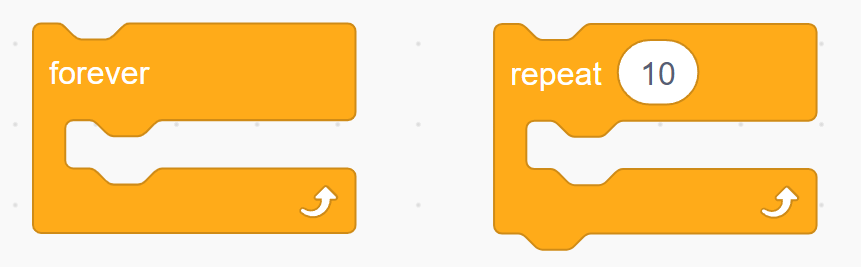
- Explain the two types of loops:
- “Repeat _ Times”: The robot will repeat an action for a specific number of times.
- “Repeat Forever”: The robot will keep repeating the action until we stop it.
Show them the code blocks on the projector screen.
- Guide students in creating their first program:
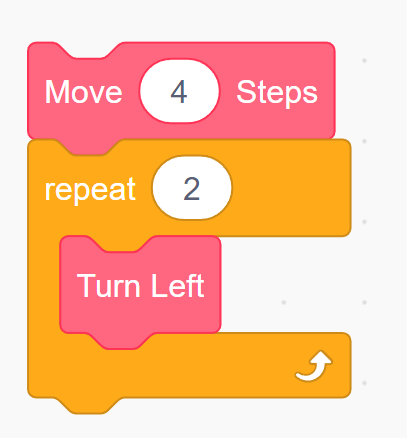
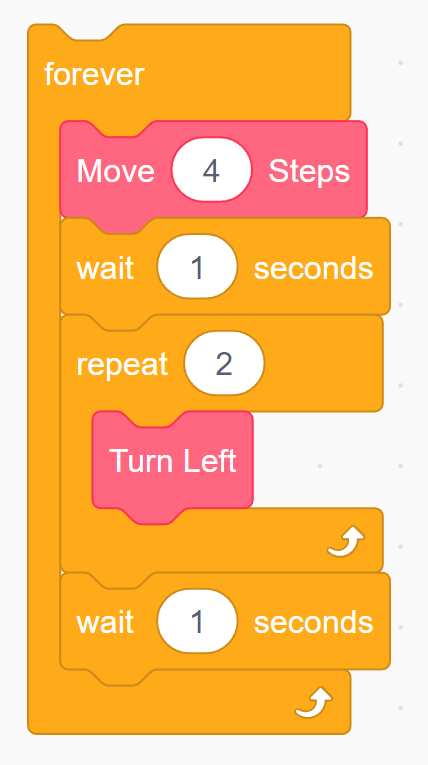
“Let’s make the robot repeat any movement you want! You’ll use the ‘Repeat _ Times’ loop to tell the robot to repeat it. Let’s say we want our robot to go forward and turn around and come back repeatedly. The first part of it is that we want the robot to move forward and rotate back to us. We can do that using the “Repeat_Times” like this:
The second part is that we want it to keep repeating this movement. For that, we can use the “Repeat Forever” block:
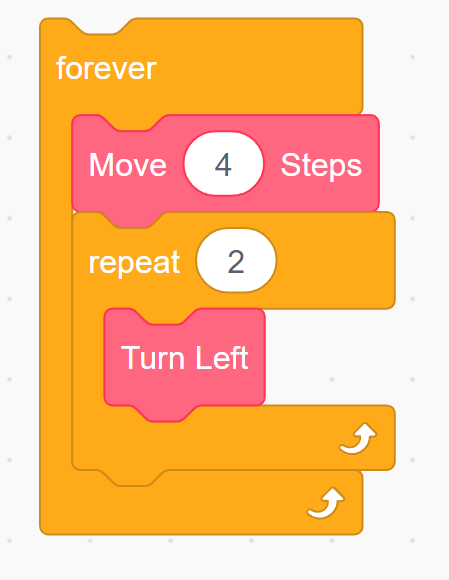
For their first loop code block, you may create this pattern for them on the projector screen and then ask them to create it.
“Let’s make the robot move in a square! You’ll use the ‘Repeat _ Times’ loop to tell the robot to move forward and turn left or right. How many sides does a square have? That’s how many times we’ll repeat the move!”
-
Guide them if they are facing any trouble creating their first code.
-
Once they complete the square pattern, instruct them to use the “Repeat Forever” loop:
“Now let’s make the robot spin continuously. We’ll use the ‘Repeat Forever’ block and see how it keeps moving until we stop it.”
- Encourgae them to try different types of movements which make the use of these Loop Blocks.
Teacher’s Role:
- Move around the class, guiding students to create loops for different movement patterns.
- Offer hints or help troubleshoot if students’ robots aren’t following the intended pattern.
3. Adding Wait Time and Expressing Emotions (15 minutes)
Activity:
Introduce the “Wait _ Seconds” block and the “Express” and “Show Text” blocks to add personality to the robot’s actions.
Instructions:
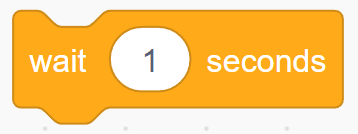
“Now that your robot is moving, let’s make it come to life! The ‘Wait _ Seconds’ block makes the robot pause before doing its next action."
-
We can make it look like it’s thinking or waiting for a signal. Let’s use the ‘Wait’ block to make our robot wait before each turn in the square.”**
-
Encourage them to play around with the number of seconds the robot waits before each action.
-
Introduce the “Show Text” and “Express” blocks:
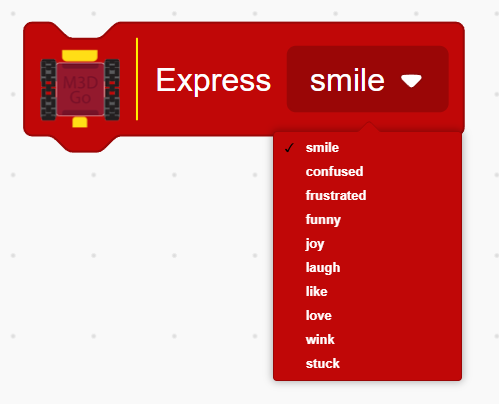
“We can make the robot talk and show emotions too! The ‘Show Text’ block lets us write anything on the robot’s screen—like ‘Hello!’ or ‘I’m thinking.’

"And the ‘Express’ block lets us show a smiley face or a wink to make the robot seem even more alive.”
- Encourage students to use these blocks in combination with their loops:
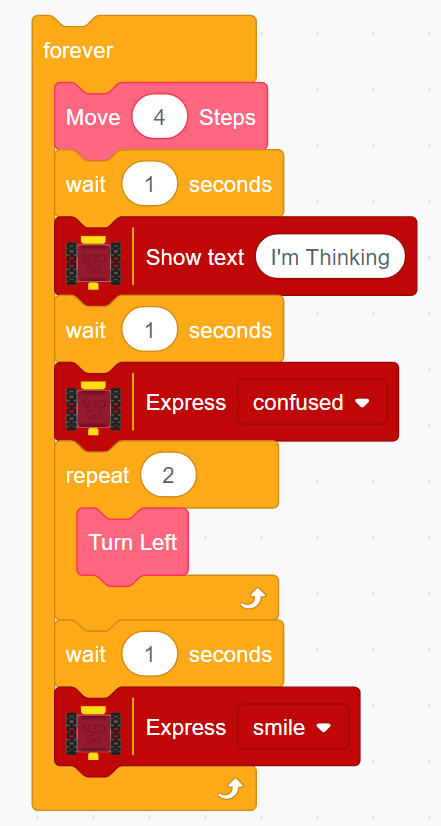
“Let’s add a ‘Wait’ and a smiley face after each time the robot completes a square. What kind of messages would you like to show on the robot’s screen?”
Their code should look like this:
- Encourage them to play around with different emotions and blocks.
Teacher’s Role:
- Guide students to experiment with timing and expressions to add personality to the robot’s movements.
- Encourage creativity as they play with different text and emoji combinations.
4. Creative Robot Choreography (15 minutes)
Activity:
In this segment, students will combine what they’ve learned about loops, waits, and expressions to create a short “dance” or movement routine for their robot. They will program the robot to move, wait, display text, and show emotions.
Instructions:
“Now that you’ve learned how to make your robot move in patterns and express emotions, let’s create a robot performance! You can combine movements with loops, add some waiting time, and display messages or faces to make it more fun.”
- Encourage students to be creative:
“What kind of dance can your robot do? Maybe it can move in a square, pause to smile, then spin in a circle while saying ‘Hello!’ Let’s see what fun routines you can come up with!”
You can also give them ideas for dance moves which they can code for their robot such as:
"How about making your robot spin in place with a big smile? You can program it to spin clockwise, stop, show a smiley face, and then twirl the other way! Maybe it can even say ‘I’m having fun!’ while it’s spinning.”
“How about making the robot move slowly forward, pause, and then show the text ‘Let’s dance!’ on its screen? After that, it can turn left and repeat the dance steps, showing a smiley face when it pauses again!”
“Imagine your robot moving in a zig-zag pattern! First, it could move forward, then turn left, wait for a second, turn right, and then display ‘Cool moves!’ on the screen with a winking emoji. You could repeat this pattern to make a fun zig-zag dance!”
Teacher’s Role:
- Move around the room to assist as students experiment with their robot’s movements, timing, and expressions.
- Encourage them to share their creative routines with the class if time allows.
5. Reflection and Wrap-Up (5-10 minutes)
Activity:
Reflect on what students have learned about loops and how they can make coding easier and more fun. Encourage students to share what they liked most about their robot’s new abilities.
Reflection Questions:
- “What was the most fun part of making your robot move on its own?”
- “How did using loops make programming easier?”
- “What’s one thing you’d like to try next with your robot?”
Teacher’s Role:
- Facilitate the reflection, helping students connect the dots between loops and how they simplify repetitive tasks in coding.
- Provide feedback and celebrate their successes, reinforcing that they’ve taken a big step in understanding coding.
Learning Outcome:
By the end of this session, students will have a solid understanding of loops in Scratch, how to use them to create efficient code, and how to combine movement with timing, text, and expressions to bring their robot to life in fun and creative ways.