Session 7: Conditional Coding – Introduction to Decision Making
Duration: 50-60 minutes
Architect: Muhammad Bilal
Learning Objectives:
- Understand how conditional statements (If-Then, If-Then-Else) work in coding.
- Program the robot to respond to different conditions using these blocks.
- Collaborate with peers to create scenarios where the robot reacts based on conditions.
- Develop problem-solving skills by using conditional logic to control the robot’s behavior.
Equipment Required:
- M3D Robotics kit (including M3D Go, its attachments, and necessary connections).
- Laptops with Scratch pre-installed.
- Paper and pencils for students to document their discoveries and ideas.
- Markers or small objects for robot navigation and interaction.
Resources:
Scratch Code File:
Grade 3 Session 7.sb3 (3.4 MB)
Lesson Plan:
1. Introduction to Conditional Statements (10 minutes)
Activity:
Introduce the concept of conditional statements, starting with If-Then. Help students understand how these statements allow robots to make decisions based on conditions, just as they do in their daily lives.
Teacher’s Role:
You may start by encouraging students to think about how they make decisions every day based on different conditions. For example, you could say:
“Where do you make decisions in your daily life based on conditions? For example, ‘If it’s raining, do you take an umbrella?’ or ‘If the light is red, do you stop?’”
You can explain that this is similar to coding, where we use If-Then statements to tell the robot:
“If the answer is correct, show a happy face and move forward.”
You may also encourage a discussion by asking how they think this relates to making decisions for the robot:
“How do you think these types of decisions could be programmed for the robot?”
Goal:
Help students connect real-life decision-making to coding and understand the concept of If-Then conditions.
2. Exploring If-Then (15 minutes)
Activity:
Students will program the robot using If-Then statements to respond to simple conditions, like moving when a math problem is solved correctly.
Instructions:
Once they develop an understanding of the concept, guide them on using the If-Then block:
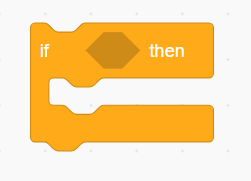
“Let’s try programming the robot with this block. If the math problem is solved correctly, then the robot will move.”
You may show them the different types of blocks they can use to introduce situations/conditions to the robot to make decisions:
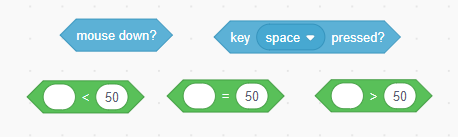
“Here’s an example: If the sum of two numbers is correct, the robot should move forward.”
You can then demonstrate how the code block works:
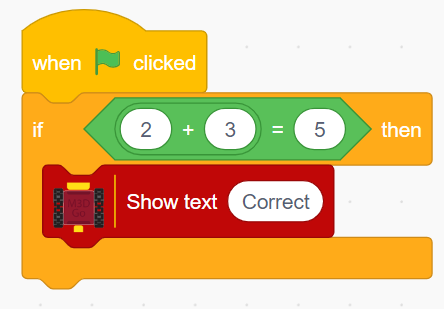
“If the robot gets the condition right, it will execute the action, like moving or turning.”
Encourage them to perform different actions based on conditions, such as:
“If a button is pressed, the robot should move forward.”
“If the sum of two numbers is correct, the robot should show a happy emoji.”
Teacher’s Role:
- Provide step-by-step guidance on how to add the If-Then block into their Scratch program.
- Help students explore and test different If-Then conditions.
- Encourage students to experiment with the conditions and observe the robot’s reactions.
- Offer troubleshooting assistance if their code doesn’t work as expected.
Goal:
Ensure students understand how to use If-Then blocks to program the robot’s responses to specific conditions.
3. Introduction to If-Then-Else (15 minutes)
Activity:
Introduce the If-Then-Else structure to show how it allows the robot to perform one action if a condition is true and a different action if it is false.
Instructions:
- Introduce the If-Then-Else block by explaining how it provides choices:
“With If-Then-Else, the robot has a choice: If the answer is correct, display ‘Correct’ and move forward. Else, move backward and show ‘Wrong.’”
You can guide students to program their robot with both the If-Then and If-Then-Else blocks:
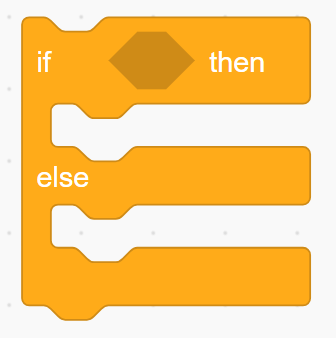
“Let’s test a new condition: If the robot detects the correct number, it will move forward. If not, it will move backward and display ‘Wrong.’”
Encourage students to experiment with different actions based on conditions, such as turning, stopping, or showing text and emojis:
“What will happen if the robot detects a wrong answer? It should show a different emoji or message!”
Teacher’s Role:
- Assist students as they test their If-Then-Else code.
- Encourage them to adjust the conditions and observe how the robot’s behavior changes.
- Offer troubleshooting help as needed.
Goal:
Help students understand how to use both If-Then and If-Then-Else blocks to program the robot’s behavior based on multiple conditions.
4. Conditional Challenges (15-20 minutes)
Activity:
Students will work in pairs to create more complex scenarios using both If-Then and If-Then-Else blocks. They will program the robot to navigate different challenges, making decisions based on multiple conditions.
Instructions:
You may set up a challenge by giving students specific tasks:
“Program the robot to decide to turn if the number on the left is greater, or turn right if the number on the right is greater.”
Encourage students to use multiple conditions in their code and test how their robot responds to different scenarios:
“If the robot sees an obstacle on the left, it will turn right. But if the obstacle is on the right, it will turn left.”
Teacher’s Role:
- Support students as they work on their challenges.
- Offer guidance where needed and encourage them to think creatively when solving problems.
- Walk around the room, providing troubleshooting and helping students refine their logic.
Goal:
Encourage students to apply If-Then and If-Then-Else logic creatively to solve more complex challenges.
5. Reflection and Conclusion (5-10 minutes)
Activity:
Wrap up the session with a reflection on how conditional logic helps control the robot’s actions. Encourage students to share what they found most interesting or challenging about using If-Then and If-Then-Else statements.
Reflection Questions:
You may ask:
“What decision did your robot make using If-Then logic?”
“Was there anything difficult about programming the robot to solve the problem?”
“What was the most fun part of controlling your robot with If-Then logic?”
Teacher’s Role:
- You may lead the discussion, encouraging students to reflect on their learning and share their experiences:
“How can we use If-Then logic in real life? What kind of decisions do we make based on conditions every day?”
Goal:
Facilitate reflection and discussion, helping students consolidate what they learned about conditional logic and its application in robotics.
Learning Outcome:
By the end of the session, students will understand how to use both If-Then and If-Then-Else statements in Scratch. They will be able to apply conditional logic to make their robots respond to different situations, improving their coding and problem-solving skills.