Session 7: Dump and Deliver – Using the Servo Motor
Session Architect: Muhammad Bilal
Duration: 50-60 minutes
Equipment Required:
- M3D Robotics kit (including M3D Go, dumping bucket attachment, and servo motor).
- Laptops with Scratch pre-installed.
- Small objects for the robot to pick up and drop.
- Black tape or markers to create lines on the floor/table for the line sensor.
- Paper and pencils for students to document their discoveries and ideas.
Learning Objectives:
- Learn how to use the servo motor and dumping bucket attachment.
- Reinforce the use of conditional logic to trigger actions.
- Combine the line sensor with conditionals to make decisions by detecting a specified mark.
- Add expressive elements such as text and emojis to make the robot’s actions come alive.
Resources:
Scratch Code for the session:
Grade 5 Session 7.sb3 (3.4 MB)
1. Introduction: Robots on a Mission! (10 minutes)
Activity:
Start with a fun, interactive physical activity where students participate to understand the concept of picking up and dropping objects. This will help build the idea of how robots can perform similar tasks using their “limbs” (the motor and dumping bucket).
Instructions:
You can begin by gathering the students together and saying:
“Let’s pretend we’re all robots for a moment! Imagine I give you a job to pick up a ball and move it to another spot. But wait, we can’t just use our hands—we need to act like a robot!”
- Ask for two volunteers. One will be the “robot,” and the other will be the “controller.”
- Give the “robot” a ball or small object and ask the “controller” to give simple instructions like:
- “Take 5 steps forward.”
- “Pick up the ball.”
- “Move to the other side and drop the ball.”
Questions for the Class:
“What do you think was happening here? How did the ‘robot’ know when to pick up the ball or drop it?”
- Build on their answers by explaining:
“That’s how robots follow instructions, just like how you helped the robot know when to pick up and drop the ball!”
Introducing the Motor and Attachments:
- Show the motor and dumping bucket to the class:
“Our robot also has its own limbs, just like you! But instead of arms, it uses this motor to move things. We’re going to program our robot to pick up an object and drop it somewhere else, just like you did!”
Teacher’s Role:
- Guide students through the physical activity to help them relate to how robots move and perform tasks.
- Ask engaging questions to build understanding of how the robot needs instructions to know when to perform actions.
- Introduce the motor and dumping bucket as the robot’s special “limbs” that will help it complete tasks.
2. Programming the Robot to Move and Dump (15 minutes)
Activity:
Students will program the robot to move forward a set distance, use the servo motor to lower the dumping bucket, and release the object.
Instructions:
- Demonstrate how to connect the servo motor to the dumping bucket and mount it on the robot.
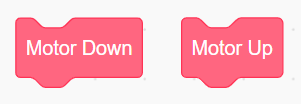
Show them the code blocks “Motor Up” and “Motor Down” which they can use to control the motor’s movement.
- Encourage them to play around with the robot’s movement to get familiar with it.
-
Guide students in writing code that moves the robot forward, lowers the dumping bucket, and dumps the object.
-
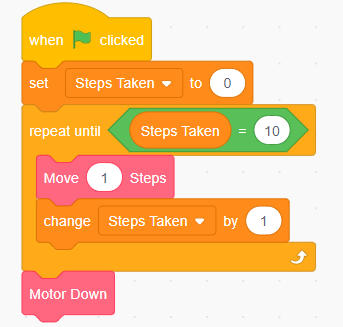
Start with a simple “if-then” condition based on timing:
- “If the robot has moved 10 steps, then dump the object.”
In this code, students will use combine the movement and motor blocks with their own variables to keep track of the number of steps and allow the robot a decision upon that.
Their code should look like this:
- Give them simple tasks to familiarize the students with the motor movement blocks.
Teacher’s Role:
- Help students connect the servo motor and ensure they understand how the bucket works.
- Guide students step-by-step through coding the robot to move and dump the object at the right spot.
3. Combining Line Sensor and Conditional Logic (20 minutes)
Activity:
Students will now use the line-following sensor to make the move a certain number of steps and reach a specific mark. When the robot reaches a marked spot, it will automatically dump the objects.
Instructions:
- Show students how to integrate the line sensor with the “if-then” block.
- “If the robot detects the marked spot, then dump the object.”
- Guide them in writing code that combines movement, line detection, and the dumping action.
- Encourage them to create a marked spot using black tape and program the robot to dump when it reaches the spot.
Their code can have any sort of movement depending on where the marker is placed followed by a Motor Down block when the robot detects the mark. An example of such a code can be:
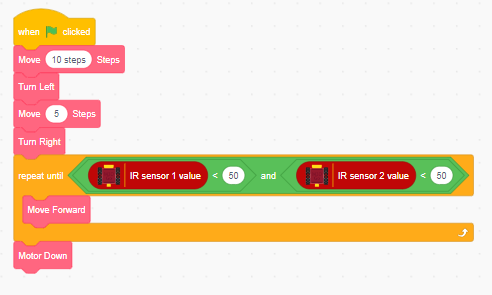
- Students have to adjust their code to make sure the movement blocks make the robot reach the mark.
Teacher’s Role:
- Demonstrate how to connect the line sensor and explain how it can be used to detect the spot.
- Provide examples and assist students in combining the line sensor with the dumping mechanism.
- Assist the students in coding the condition which makes the robot detect the mark.
4. Bringing the Routine to Life with Text and Expressions (5 - 10 minutes)
Activity:
Now that the robot is performing the basic task, students will make the routine more engaging by adding expressive elements like text and emojis.
Instructions:
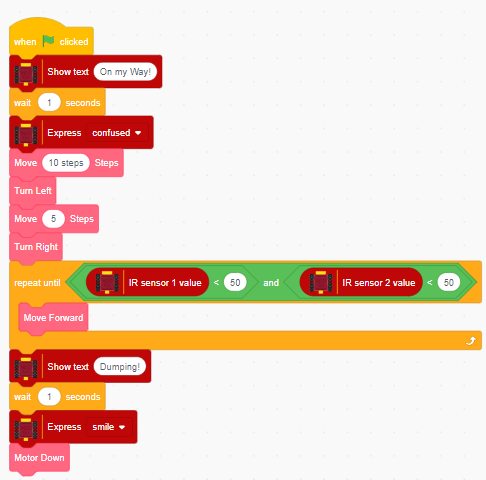
- Encourage students to display messages like “On my way” or “Dumping" when the robot is performing the action.
- They can also code the robot to combine both text and emojis at different stages of the routine:
- “When the robot starts moving, show ‘On my way!’” with a serious face.
- “When the robot reaches the spot, show ‘Dumping!’ and display a happy face.”
- Encourage them to get creative and make their robot’s routine more fun.
A sample code of the combination of dumping action and expression can be:
Teacher’s Role:
- Provide examples of how to use text and emojis to make the robot more expressive.
- Support students as they combine the expressive elements with the movement and dumping actions.
5. Reflection and Conclusion (5 minutes)
Activity:
Students will reflect on how their robots performed, discussing what worked well and what they might improve.
Reflection Questions:
- “What was the most fun part of programming your robot today?”
- “How did you make your robot decide when to dump the object?”
- “What would you do differently next time to make your robot even better?”
Teacher’s Role:
- Lead the reflection discussion, encouraging students to think about how they used conditionals and sensors.
- Celebrate their success in making their robots come alive with expressive text and actions.
Learning Outcome:
By the end of the session, students will have learned how to use servo motors and conditional logic to control the robot’s actions. They will have successfully programmed their robot to move, detect a spot, dump an object, and show expressive messages throughout the routine.