Session 8: Robot Movers – Picking and Dropping Objects with Logic
Duration: 50-60 minutes
Equipment Required:
- M3D Robotics kit with the servo motor and dumper attachment.
- Laptops with Scratch pre-installed.
- Small objects for the robot to pick up and move (e.g., blocks, small toys).
- Paper and pencils for students to document their discoveries.
- Black tape for marking the path the robot will follow.
Learning Objectives:
- Understand how to use the servo motor to control the dumper attachment.
- Program the robot to pick up and move objects using loops and if-then logic.
- Reinforce basic movement and turning logic from previous lessons.
- Incorporate expressions and text into the robot’s actions to make the task more interactive.
- Learn to use the Follow Path block to automate the robot’s navigation.
Resources:
Scratch code for the session:
Grade 4 Session 8.sb3 (130.9 KB)
1. Introduction to Picking and Moving Objects (10 minutes)
Activity:
Begin by introducing the concept of picking up and moving objects, relating it to how we use our hands or cars to transport things from one point to another. Relate this idea to the robot, explaining how the dumper attachment will help the robot do the same.
Instructions:
- You might say:
“We pick up and move things every day—whether it’s moving books from a desk or using a truck to transport objects. Today, we’re going to teach our robot how to pick things up and move them too, just like Bob the Builder’s machines. But this time, we’re adding some cool logic!”
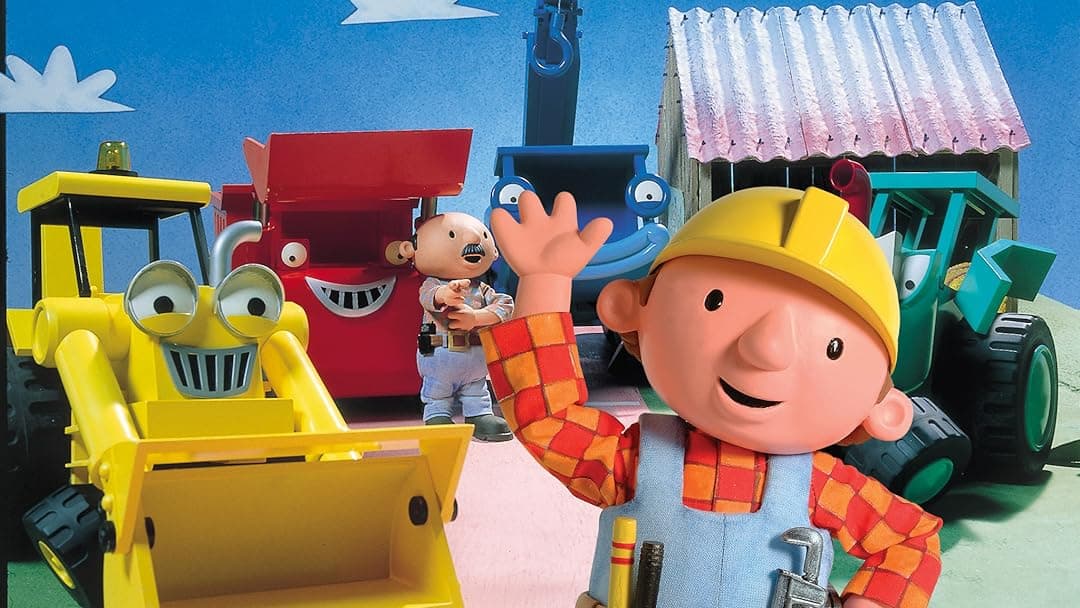
- Show the students the dumper attachment and explain how it works with the servo motor to lift and lower objects.
Teacher’s Role:
- Use examples of everyday object transport to explain the robot’s task.
- Keep the tone engaging, using a relatable example like “Bob the Builder” to connect the task to the real world.
2. Connecting the Servo Motor and Dumper Attachment (10 minutes)
Activity:
The teacher will guide students through connecting the servo motor and dumper attachment to the robot. Once connected, students will learn how to control the dumper using the new “Motor Up” and “Motor Down” blocks in Scratch.
Instructions:
- Guide students in connecting the servo motor and dumper attachment to the robot.
- Demonstrate how to use the “Motor Up” and “Motor Down” blocks to control the dumper’s movement:
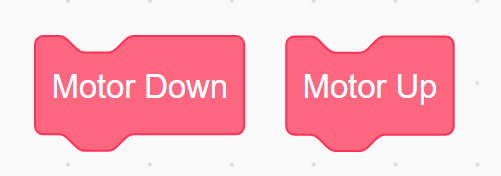
“When you use the ‘Motor Up’ block, the dumper lifts up, and ‘Motor Down’ will lower it. Let’s try it out!”
- Allow students to experiment with moving the dumper up and down, testing how it works with small objects.
Teacher’s Role:
- Assist students in setting up the servo motor and dumper, ensuring everyone has their attachments connected properly.
- Encourage students to experiment with the motor blocks, guiding them through any challenges.
3. Moving Objects with the Robot (15 minutes)
Activity:
Students will program the robot to pick up small objects using the dumper attachment, transport them across the room, and drop them at a designated location. They will use the Motor Up and Motor Down blocks along with basic movement blocks.
Instructions:
- You might say:
“Now it’s time to make our robot pick things up and move them! We’ll use the dumper to load small objects, move to a new spot, and then drop the objects off.”
-
Guide students in programming the robot:
- Move the robot to the pick-up point using Move Forward or Turn blocks.
- Use Motor Down to lower the dumper and collect the object.
- Program the robot to move to the drop-off point.
- Use Motor Up to release the object at the target location.
-
Let students experiment with different routes and objects, ensuring they understand how to combine movement and motor control.
Teacher’s Role:
- Provide guidance as students write their code, helping them understand how to combine movement blocks with motor control.
- Encourage students to test their robots and adjust their code for smoother pick-up and drop-off actions.
4. Using the Follow Path Block (15 minutes)
Activity:
Introduce the Follow Path block that the students learned in the previous session. This block will allow the robot to automatically follow a black line taped on the floor. The robot will follow the path, pick up objects, and then dump them at the end of the path.
Instructions:
- You might say:
“Let’s make our robot even smarter by teaching it to follow a path! Just like how you follow a path to go from one place to another, our robot can follow a line to get to its destination.”
- Guide students in using the Follow Path block:
- Place black tape on the floor to mark the path from the pick-up point to the drop-off point.
- Program the robot to use the line follower code block to follow the path marked by the black tape.
- After reaching the end of the path, use the Motor Down block to drop the object.
- Students can do that by adding “Motor Down” instructions when the line ends (when both IR sensor 1 and IR sensor 2 go back to normal reading)
- Encourage students to experiment with different paths and fine-tune their code for precise dumping at the end of the path.
Their code should look like this:
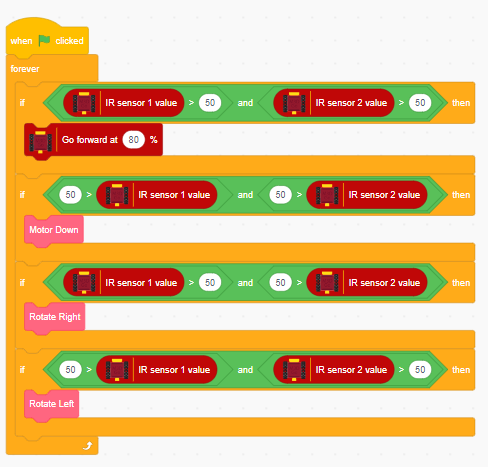
Teacher’s Role:
- Assist students as they program the robot to follow the path and dump objects.
- Encourage creativity with different path designs and ensure students understand how the Follow Path block works in combination with the motor blocks.
5. Reflection and Wrap-Up (5-10 minutes)
Activity:
Gather students to reflect on their experience programming the robot with motors, the Follow Path block, and dumping objects. Let them share what they found fun and challenging.
Reflection Questions:
- “What was the most fun part about using the Follow Path block?”
- “How did your robot know when to dump the object?”
- “What would you try differently next time to improve how your robot follows the path?”
Teacher’s Role:
- Lead the reflection discussion, helping students think critically about how they combined movement, motor control, and path-following in their robot.
- Celebrate their achievements and encourage them to think of more complex challenges in future activities.
Learning Outcome:
By the end of the session, students will have learned how to use the Follow Path block to automate the robot’s movement along a designated path and use the servo motor to control the dumper attachment. They will have reinforced basic movement skills and implemented more advanced coding concepts such as automating tasks using path-following.