Session 2: Math & Movement with Scratch
Session Architect: Muhammad Bilal
Session Length: 50-60 minutes
Learning Objectives:
- Understand the basic idea of block coding in Scratch.
- Use basic Go/Move blocks in Scratch to control the robot’s movement.
- Create commands that move the robot based on math problems(Arithmetic operators i.e. addition, subtraction etc.).
- Reinforce mathematical concepts through programming.
Equipment Needed:
- Laptops with Scratch pre-installed.
- M3D Go Robotics Kit with sensors.
- Printed activity sheets with math problems.
- Markers and small obstacles for robot navigation.
Teaching Aids
- Projector and screen (optional for the video demonstration).
- Scratch app running on a projector for better visual aid.
Resources:
Scratch Code File:
Grade 3 Session 2.sb3 (3.4 MB)
Lesson Plan:
1. Introduction to Scratch Coding (20 minutes)
Activity: Introduction to Scratch Interface
Objective: Familiarize students with the basic components of the Scratch coding interface.
Teacher’s Role:
- Help students understand different parts of Scratch.
- Encourage students to play with different features of Scratch.
- Guide students through basic movement examples, such as moving a robot forward.
Instructions:
- Show the Scratch interface on the projector.
- Introduce basic elements: Sprites, Blocks, and Stage. Show them the basic blocks and explain their purpose.
You may give an example as:
Here’s an introductory paragraph that relates the concept of block coding in Scratch to how 2nd graders might use blocks in their daily life:
“Have you ever built something cool using blocks, like stacking them together to make a tower or a fun design? Well, today we’re going to do something similar, but instead of building with blocks to make a tower, we’ll be stacking coding blocks on the screen to tell our robot what to do!
Each block is like a step in giving directions—one block might tell the robot to move forward, while another might make it turn. By putting them together, we can create a whole series of actions for our robot, just like building with blocks!”
- This introduction connects the idea of block coding to something familiar and tangible for 2nd graders, helping ease them into the concept.
- Encourage them to use blocks to control the robot’s movement instead of a gamepad.
- Start with the most basic “When Clicked” block so that they know how to start any code they’ve made.

- You may combine it with simple movement instructions such as the “Go Forward” or “Go Backward” so that they can see the code in action and control the movement of M3D Go without the gamepad. After that, they can play with Rotate blocks as well.
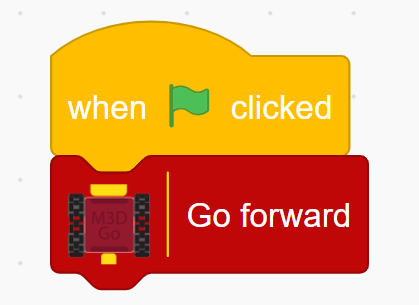
- Allow them to play around with the blocks and the drag-and-drop environment of Scratch.
- Point out to them how different blocks have different shapes and how that tells where it can be placed.
- Let them play around with the drag-and-drop feature of blocks to see how different blocks fit with one another.
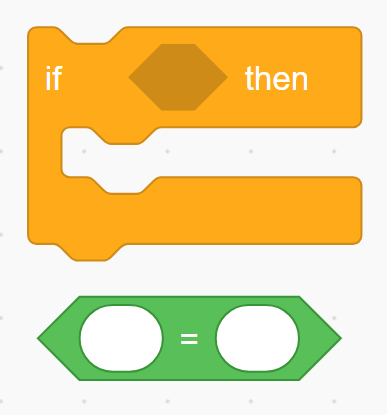
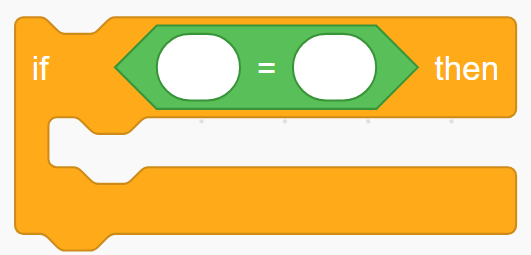
The understanding of the use of these blocks is not the goal here. The purpose of this activity is so that the students understand the reason why different blocks have different shapes.
2. Guided Activity: Math-Based Robot Movement (25 minutes)
Activity: Programming the Robot Using Math Problems
Objective: Use Scratch blocks to move the robot a certain distance based on given multiplication or division problems.
Teacher’s Role:
- Move around the class, helping students translate their math problems into block commands in Scratch.
- Encourage students to use different types of movement blocks e.g. forward, backward, rotation etc.
Instructions:
-
Provide each student with a math problem. You can give them problems like:
- “If the robot takes 3 cm long steps and it needs to travel a distance of 27 cm, how many steps does it need to take?”
- The robot travels 6 cm with each step. If it needs to cover a total of 36 cm, how many steps will the robot take?"
- The robot needs to cross a distance of 24 cm. If each step it takes is 4 cm long, how many steps will it take to cover the distance?"
-
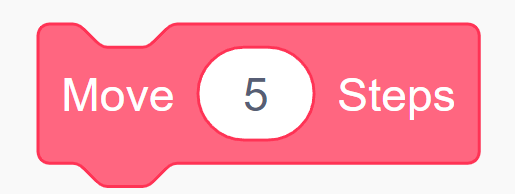
First allow them to solve the problems on the problem sheet. Then they can move the robot the number of steps their answer is using the “Move_ Steps” block.
-
The teacher can place blocks or markers at certain distances based on the answer and see if the robot reaches that point. If it does, that means that their answer is correct.
3. Independent Practice: Create Custom Math Challenges (10 minutes)
Activity: Student-Created Math Problems
Objective: Encourage students to create their own math challenges for their classmates.
Teacher’s Role:
- Monitor progress, ensuring that students understand both the math and the coding aspects.
- Provide assistance as needed and praise creative problem-solving.
- Make sure that all students participate in the activity.
Instructions:
- Have each student write a simple multiplication or division problem on a piece of paper.
- Exchange problems with a partner.
- Each group programs the robot to move after solving the other groups’ math problem using Scratch.
4. Robot Navigation Challenge (10 minutes)
Activity: Obstacle Course Navigation
- Objective: Apply math and coding skills to navigate the robot through an obstacle course.
Teacher’s Role:
-
Provide instructions and guide the students in calculating and coding the correct movements.
-
Highlight successful completion of the course and encourage students to refine their commands if needed.
-
Instructions:
-
Set up a simple obstacle course with markers indicating specific distances (e.g., 10 steps to the first marker and then a wall where the robot has to turn left, 5 steps to the second).
-
Students program their robots to move specific distances based on given math problems to reach the markers.
5. Reflection and Discussion (5 minutes)
Activity: Class Reflection
Objective: Reflect on what they learned about coding and math.
Instructions:
- Ask students to share one thing they found easy and one thing they found challenging.
- Discuss how math and coding work together to control the robot.
Teacher’s Role:
- Facilitate discussion, encourage students to think about real-life applications of what they learned, and provide positive feedback.