Grade 2 – Session 1: “Reaction Time Race”
Architect: Aleeza Ayaz - Markhor3D
Session Length: 50-60 minutes
Session Overview:
In this first MeasureLab session, students dive into a friendly “Reaction Time Race.” Using MeasureLab’s touchpad, they’ll test how fast they can react to sounds. Working in pairs, students take turns as the “sound maker” and the “reactor.” When they hear a sound, they tap the touchpad as quickly as possible, with their reaction time displayed on the screen. They’ll record their results, trying to improve with each round. Through this activity, students learn how their ears, brain, and hands work together to respond to sounds, turning a simple game into a fun exploration of their senses and reflexes.
Learning Objectives:
In this session, students will:
- Measure and compare reaction times to auditory stimuli.
- Understand how timers can show how quickly they respond to sounds.
- Begin exploring the connection between hearing a sound and reacting to it.
- Work in pairs to test each other’s reaction times and record their results.
Teacher Resource:
Session File: ML21.plf (62.0 KB)
Equipment Required:
- MeasureLab with built-in touchpad sensor.
- Laptop or PC to display reaction times.
- Worksheet for recording reaction times.
- Pens, pencils, markers, etc.
Teacher Aids:
- Projector (optional).
Preparation:
This step has to be done before the session on each workstation/apparatus by the teacher/session instructor:
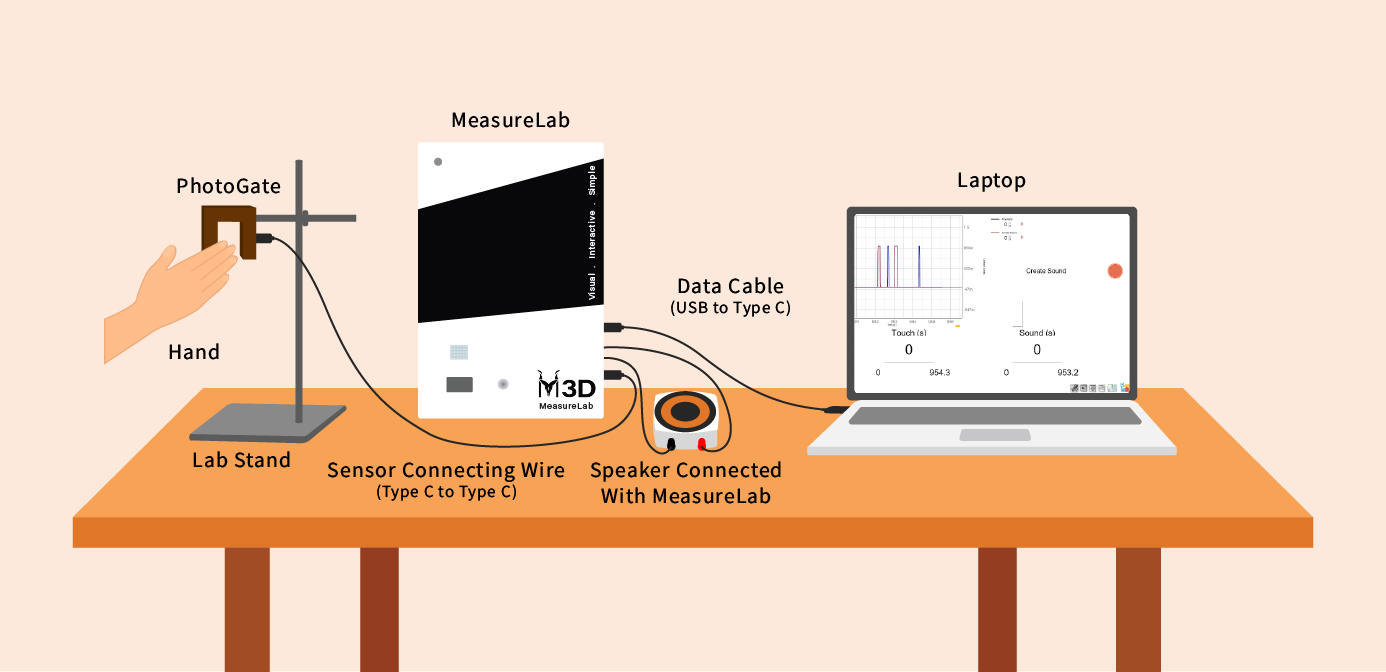
- Make sure that each computer has Physlogger installed and can detect the Measrelab when connected to it using the provided cable.
- Each Measurelab should have access to a power outlet for sensors that require external power.
- Connect the Photogate to the Measurelab using the following port:

- Launch the Physlogger application and load the session file provided in the resources section.
Your setup will look something like this:
Introduction and Demonstration: (10 minutes)
-
You may start with a demonstration:
- The teacher can say:
“Let’s play a quick game. When I say ‘Go,’ everyone raise their hands as quickly as possible!”
- Wait for the students to respond and raise their hands.
-
You may then ask:
“Did everyone raise their hands at the same time? Some of you were faster, and some were a bit slower! Let’s see today how quickly we can respond when we hear something, like a sound.”
Explaining Reaction to Auditory Stimuli
- You may say:
“Today, we’re going to test how fast you can respond to sounds. When you hear a sound, like when someone claps or shouts ‘Go,’ your brain tells your body to react. The time it takes for you to react to a sound is called your reaction time.”
Hands-On Exploration: (30-40 minutes)
-
Step 1: Group Setup
- Divide the class into groups of four, with students working in pairs for the activity.
- Explain that each pair will test their reaction times with the auditory stimulus, one student tapping the touchpad when they hear a sound, and the other student observing.
-
Step 2: Testing Reaction Time with Auditory Stimulus
You may explain the procedure:
“One student will press the on-screen button to create a sound. When your partner hears the sound, they pass their hand through the Photogate as quickly as possible.”
The reaction time will show up on the screen, and the students will record it in their worksheet.
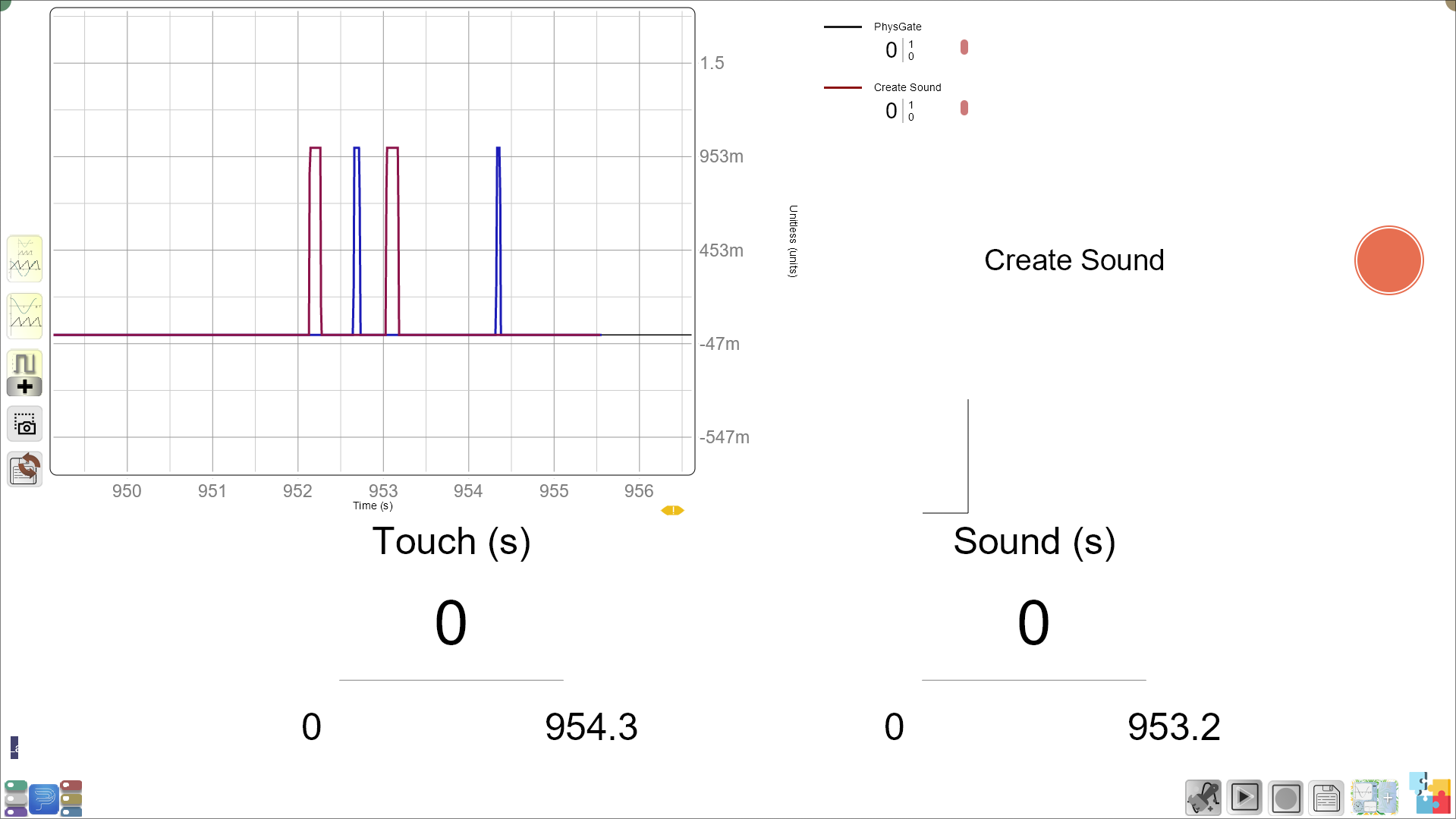
Their reaction time will be the difference between the time of sound and time of touch in the lower section of the screen.
- You may ask the students:
“What does the number on screen tell us? How quickly did you react to the sound? Do you think you can react even faster if you try again?”
Guided Questions and Follow-up: (10 minutes)
Recording Reaction Times
- Each pair will take turns, and students will record their reaction times on the worksheet.
Worksheet Example:
| Pair | Auditory Reaction Time (seconds) |
|---|---|
| Pair 1 | |
| Pair 2 | |
| Pair 3 | |
| Pair 4 |
-
After each round, you may ask:
- “What do you notice about your reaction times? Were some faster than others?”
- “Do you think you can improve your reaction time by listening more carefully?”
-
Encourage students to reflect:
- “Why do you think some people might have faster reaction times than others?”
Reflection and Summary: (5 minutes)
-
You may summarize:
“Today, we learned about how quickly we can respond to sounds. Some of us were really fast, and others needed a little more time, but that’s okay! Everyone reacts differently.”
-
You may end by connecting the activity to real life:
“Next time you hear a loud sound, like a car horn or a bell, remember how quickly your brain works to help you react!”