Grade 4 - Session 6: “Force and Friction: Making Work Easier with Levers”
Session Architect: Aleeza Ayaz - Markhor3D
Session Length: 50-60 minutes
Session Overview
In this session, students will explore how friction affects the force needed to move objects across different surfaces and observe how tools like levers can make work easier. Using a load cell, they will qualitatively measure the force needed to move objects on various surfaces and understand how friction plays a role. They will then experiment with a simple lever to lift objects, comparing how much effort it takes to lift heavy and light objects. By measuring the objects’ weight with a load cell and observing how the lever reduces effort, students will connect these concepts to tools they see in daily life, such as seesaws or bottle openers.
Learning Objectives
Students will:
- Learn about the concept of friction.
- Explore how friction changes with different surfaces.
- Observe how friction affects the force needed to move objects.
- Use a lever to lift objects and see how it reduces the effort required.
- Compare the effort needed to lift heavy and light objects with and without a lever using a load cell.
- Relate their observations to everyday tools and machines that use friction and levers to make tasks easier.
Teacher Resource:
Session File: ML46.plf (62.9 KB)
Equipment Required
- MeasureLab.
- Objects to test (e.g., a heavy cube and a light block).
- Surfaces with varying textures (smooth tile, carpet, sandpaper).
- A ruler to use as a lever.
- A small block or object for the lever to rest on.
- Worksheet for recording observations and reflections.
- Optional: a chair or similar item for a class demonstration.
Preparation:
This step has to be done before the session on each workstation/apparatus by the teacher/session instructor:
- Make sure that each computer has Physlogger installed and can detect the Measrelab when connected to it using the provided cable.
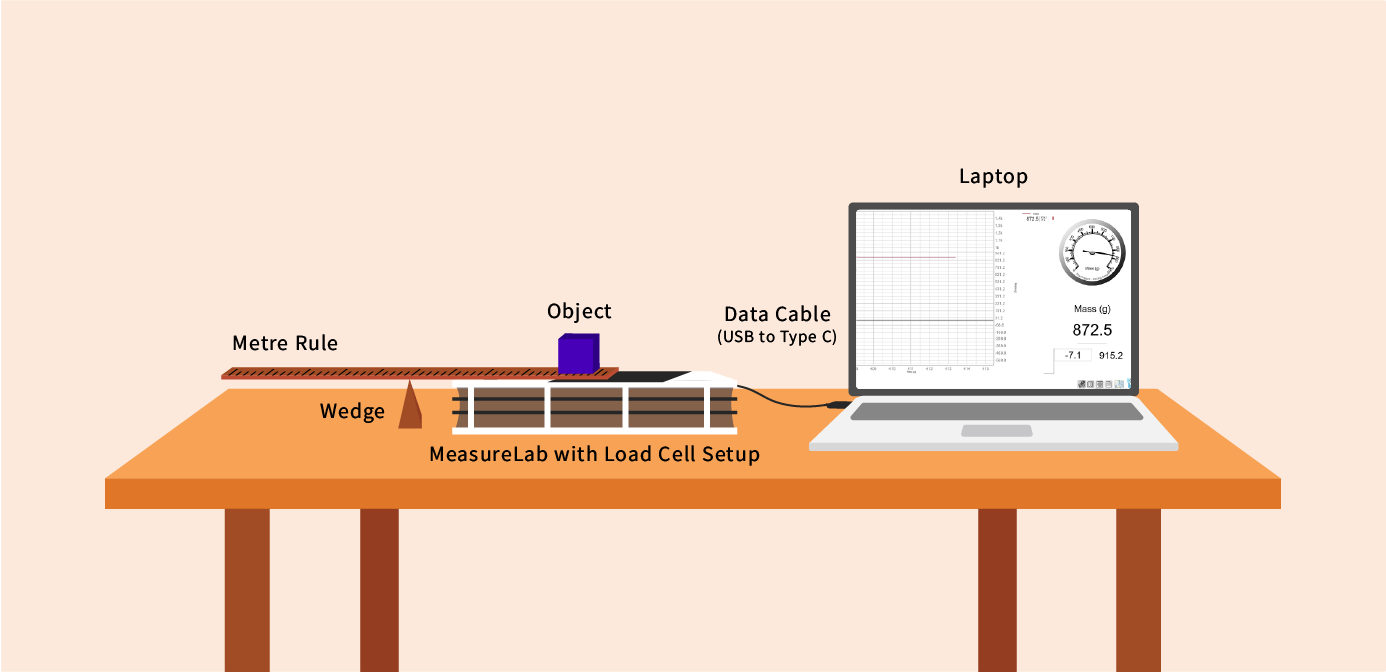
- Each Measurelab should have access to a power outlet for sensors that require external power. For this session, we will use the Load Cell in the default setup and with horizontal mounting attachment.
- Launch the Physlogger application and load the session file provided in the resources section.
Your setup will look something like this:
Part 1: Understanding Friction
Introduction and Engagement
“Have you ever tried to slide a chair across a smooth floor? Was it easy or hard?”
“What if you tried to slide it on a carpet instead? What do you think would happen?”
Let the students share their thoughts and predictions. If possible, demonstrate this in the classroom by sliding a chair on a smooth floor and then on a piece of carpet. Ask them to observe and describe what they see.
Explain that friction is a force that makes it harder for things to move. It happens when two surfaces rub against each other. Some surfaces, like smooth tiles, have less friction, while rough surfaces, like sandpaper, have more friction.
Activity: Measuring Friction on Different Surfaces
- Place the load cell on a flat surface, and have students choose an object, such as a block or toy.
- One by one, place the object on the load cell and gently pull it across a surface, like a smooth tile. Ask them to notice how hard or easy it is to pull the object.
- Repeat this process on different surfaces, such as carpet, sandpaper, and wood. For each surface, have students record their observations in a table like this:
| Surface | Ease of Movement (Easy/Moderate/Hard) | Friction Value (Low/Medium/High) |
|---|---|---|
| Smooth Tile | ||
| Carpet | ||
| Sandpaper | ||
| Wood |
Discussion and Examples
“Which surface made it easiest to move the object? Which one made it hardest? Why do you think that happened?”
Explain that smooth surfaces, like tiles, have less friction, so it’s easier for objects to move. Rough surfaces, like sandpaper, have more friction, which makes it harder.
“Can you think of other examples where friction makes it harder to move something? What about when you slide a toy car on the floor versus on a rug?”
If time allows, demonstrate sliding a toy car on different surfaces in the classroom.
Part 2: Making Work Easier with Levers
Introduction and Engagement
“Have you ever tried to lift something heavy, like a big box? Was it easy or hard?”
“If it’s too heavy to lift, what could you do to make it easier?”
Allow the students to share ideas. If no one mentions it, guide them by asking:
“What about using a tool, like a plank or a board? Could that help?”
This leads into the concept of a lever as a tool to make lifting easier.
Activity 1: Comparing Light and Heavy Objects with a Lever
- Measure the Weight: Use the load cell to measure the weight of a heavy object, such as a geometry block, and a light object, such as a small wooden block. Record their weights.
- Set up the Lever: Place a ruler or plank on a small block to act as the fulcrum of the lever.
- Test Lifting: Place the heavier object on one end of the ruler. Have a student press down gently on the other end and describe how easy or hard it is to lift the heavy object.
- Repeat for Light Object: Repeat the process with the light object. Ask the students to compare how easy it is to lift each object with and without the lever.
- Record Observations: Students should record their qualitative observations in a table:
| Object | Weight (from Load Cell) | Lifting Without Lever (Easy/Hard) | Lifting With Lever (Easy/Hard) |
|---|---|---|---|
| Heavy Object | |||
| Light Object |
Activity 2: Exploring the Fulcrum’s Placement
-
Introduce the Concept: Ask the students:
“What would happen if we change the position of the block (fulcrum) underneath the ruler? Would it be easier or harder to lift the heavy object?”
-
Experiment Setup: Use the same ruler or plank, but this time, experiment with moving the fulcrum closer to the object (load) or farther away from it.
-
Test and Observe:
- Place the fulcrum closer to the heavy object. Test how much effort is needed to lift it.
- Move the fulcrum closer to the side where you press down and test again.
- Encourage students to note differences in effort required for each position.
-
Record Results: Create a table to track how fulcrum placement affects effort:
| Object | Fulcrum Position | Effort Needed (Easy/Hard) |
|---|---|---|
| Heavy Object | Near the load | |
| Heavy Object | Center | |
| Heavy Object | Near effort |
Discussion and Examples
“What happened when you moved the fulcrum closer to the object being lifted? Was it easier or harder to lift?”
Explain that the fulcrum’s position affects the amount of force required. Moving the fulcrum closer to the load reduces the effort needed.
“Why do you think that happened? How does the fulcrum’s placement change how the lever works?”
“What other tools or machines might let you adjust how hard or easy it is to lift or move things?”
Encourage students to share ideas, leading them to think about seesaws, crowbars, or bottle openers.
Reflection and Summary
Reflection Questions
At the end of the session, ask the students to reflect:
- “How did changing the fulcrum’s position affect the effort needed to lift the object?”
- “Which fulcrum position made lifting the easiest? Why?”
- “What other tools or machines use the idea of adjusting effort to make work easier?”
Wrap-Up Discussion
Summarize the session by saying:
“Today, we saw how the position of the fulcrum in a lever changes how much effort we need to lift something. Engineers use this principle to design tools and machines that help us do work with less effort.”
Real-Life Connection
End by asking:
“Can you think of other tools or toys you use that work like levers? What happens when you use them in different ways?”