Grade 6 - Session 9: “Building a Light Sensor”
Architect: Shayaan Haider - Markhor3D
Session Length: 50-60 minutes
Session Overview:
In this session, students will build and explore a simple light-sensing circuit using an LDR (Light Dependent Resistor) and a voltage divider. They will investigate how light intensity affects voltage in the circuit and observe how an LED responds to changes in light levels. Using MeasureLab, students will measure real-time voltage changes as light conditions vary, recording and analyzing data to understand the relationship between light, voltage, and resistance. This hands-on session also develops practical circuit-building skills, introducing key components like resistors, LDRs, and LEDs, while fostering a deeper understanding of circuit behavior.
Learning Objectives:
In this session, students will:
- Build and understand a simple light-sensing circuit using an LDR (Light Dependent Resistor).
- Explore the relationship between light intensity and voltage in a circuit.
- Observe how an LED lights up when the light intensity decreases and understand how resistance and voltage control the LED’s behavior.
- Use MeasureLab to measure voltage changes in real-time as light conditions change.
- Record and analyze data to draw connections between light levels, voltage, and circuit behavior.
- Develop skills in circuit building using a breadboard and understand basic components like resistors, LDRs, and LEDs.
Teacher Resource:
Session File: ML69.plf (55.6 KB)
Equipment Required:
- PC/Laptop to display measurement and live plot
- Breadboard for circuit building.
- Light Dependent Resistor (LDR).
- Resistors (e.g., 220Ω for the LED current-limiting resistor).
- LED to turn on when the light decreases.
- Jumper wires to connect components.
- Battery or power source (e.g., 9V battery or power supply).
- MeasureLab
- Light source to vary light intensity.
- Worksheet for recording voltage readings and observations.
- Pens, pencils, markers, etc.
Teaching Aids:
- Visual aids: Diagrams of voltage divider circuits, LDRs, and LED circuits.
- Projector (optional) to display real-time voltage plots from MeasureLab.
Preparation:
This step has to be done before the session on each workstation/apparatus by the teacher/session instructor:
- Make sure that each computer has Physlogger installed and can detect the Measrelab when connected to it using the provided cable.
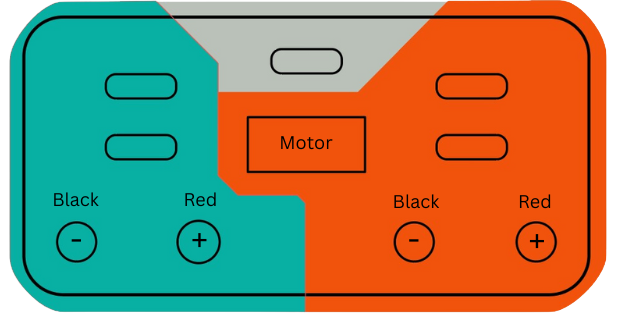
- Each Measurelab should have access to a power outlet for sensors that require external power. For this session, we will use voltage input & output terminals which requires external power source to be connected.
- Use the provided Banana-to-Banana cables to connect your circuit to the Measurelab using the following analog port:
- Once connected, launch the Physlogger application and load the session file provided in the resources section.
Your setup will look something like this:
Image Loading ...
Introduction and Hands-On Exploration: (30 minutes)
Engaging Students with Everyday Examples of Light Sensors:
- You may start by asking:
“Have you ever noticed how street lights turn on automatically when it gets dark? Or how some electronic devices adjust their brightness in low light? How do you think that happens?”
- Let students share their ideas, then build on their responses by explaining:
“These devices use a light sensor that detects the amount of light around it. When the light level drops, the sensor sends a signal to turn on or adjust the device. Today, we’ll build a circuit that will light up an LED when it gets dark.”
Introducing the Light Dependent Resistor (LDR):
- You may ask:
“Have you ever seen something change automatically based on how light or dark it is? How do you think a sensor knows when it’s dark?”
- Explain the concept of an LDR:
“We’re going to use a Light Dependent Resistor, or LDR. This is a special type of resistor that changes its resistance based on the amount of light that hits it. When there’s a lot of light, the resistance is low, and when it’s dark, the resistance increases.”
What is a Voltage Divider Circuit?
- You may continue by asking:
“If the LDR’s resistance changes with light, how do you think we can measure that change? How can we make it control something, like an LED?”
- Introduce the voltage divider circuit:
“We’re going to build a voltage divider circuit. This type of circuit splits the input voltage between two components—in our case, an LDR and a resistor. As the light level changes, the resistance of the LDR changes, which affects how the voltage is divided between the two. When it gets dark, the LDR’s resistance increases, causing the voltage across it (or across the resistor, depending on the wiring) to change. We’ll use this change in voltage to control an LED and light it up when it’s dark.”
Discuss the idea of a voltage divider with them and start a discussion about the components involved in the voltage divider circuit. You may draw the circuit on a board or have an image of it on a projector screen for a better visual understanding.
“Now, you might wonder why we need a resistor at all—why not just use the LDR by itself? The reason is that an LDR on its own doesn’t create a measurable voltage drop that changes with light—it just changes resistance. We need something to compare that resistance against, and that’s where the resistor comes in. Together, the LDR and the resistor form a voltage divider, which turns the changing resistance into a changing voltage we can actually read and use.”
Step 1: Setting Up the Circuit on a Breadboard
- You may explain:
“We’ll use a breadboard to build our circuit. This board lets us easily connect and disconnect parts without needing fix them permanently.”
-
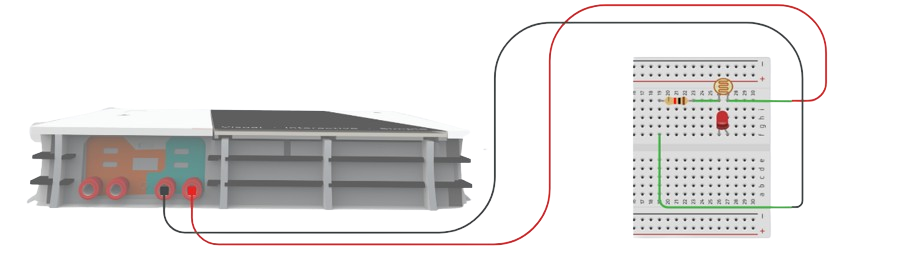
Building the Light Sensor Circuit:
- Place the LDR on the breadboard.
- Connect one leg of the LDR to the positive terminal of the battery.
- On the other leg of the LDR, place a 220Ω resistor. Connect the other end of this resistor to ground (negative terminal of the battery).
- Jumper wires: Connect two wires parallel to the LDR. They will help us measure the voltage across the LDR in different conditions.
Step 2: Connecting the LED to Light Up in the Dark
- You may ask:
“Now that we have a light sensor, how do you think we can use it to control an LED? What do you think will happen when it gets dark?”
-
Adding the LED to the Circuit:
- Connect the LED in parallel to the resistor across the LDR.
Explain to the students how current flows in the circuit under different light conditions:
- When the light is bright, the LDR will have low resistance, and most of the voltage will drop across the fixed resistor, keeping the LED off.
- When it’s dark, the LDR’s resistance increases, and the voltage across the LED increases, allowing it to turn on.
Step 3: Observing Voltage Changes and LED Behavior
- You may ask:
“Now that we’ve built our light sensor circuit, what do you think will happen when we shine light on the LDR? What about when it’s dark?”
-
Using MeasureLab to Record Voltage:
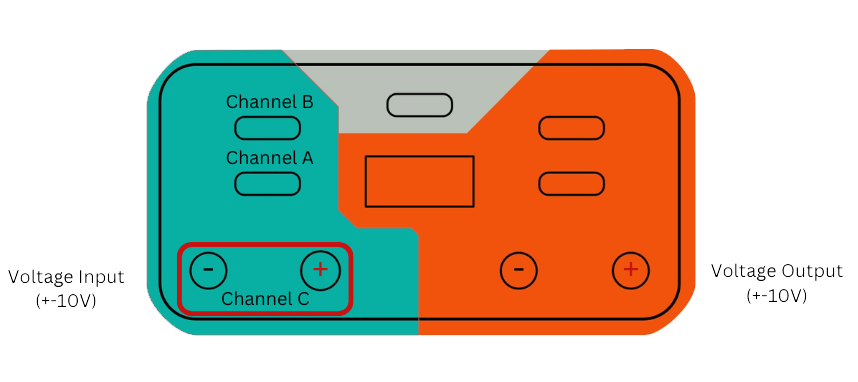
- Connect the Voltage Input wires of MeasureLab to the jumper wires connected with terminals of the LDR and observe the live voltage readings.
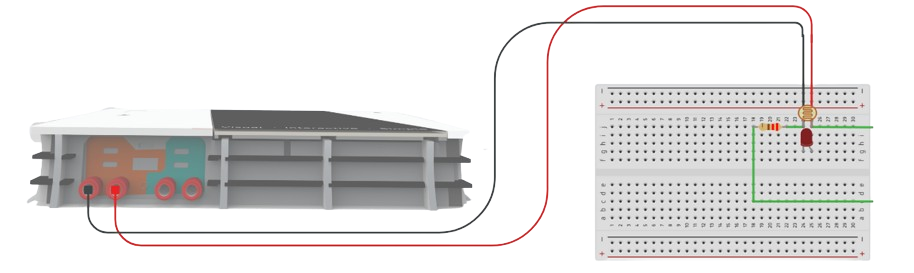
- Shine a flashlight on the LDR and observe the voltage and the LED (which should remain off).
- Cover the LDR to simulate darkness and watch the LED turn on as the voltage changes.
Recording Data:
| Light Condition | Voltage (V) | LED Status |
|---|---|---|
| Bright Light | Off | |
| Dim Light | Dim | |
| Darkness | On |
Step 4: Exploring the Relationship Between Light and Voltage
- You may ask:
“What happened to the voltage when more light hit the LDR? And what about when it got dark?”
- Explain the Concept:
“As the light gets brighter, the LDR’s resistance goes down, and more voltage is dropped across the fixed resistor. When it gets dark, the LDR’s resistance increases, allowing more voltage to power the LED.”
Guided Activity and Worksheet: (15-20 minutes)
-
Recording Observations:
- Students will record the voltage at different light levels (bright, dim, dark) and note when the LED turns on.
- You may ask:
“Why do you think the LED turns on in the dark and stays off in bright light?”
Worksheet Table:
| Light Condition | Voltage (V) | LED Status |
|---|---|---|
| Bright Light | Off | |
| Dim Light | Dim | |
| Darkness | On |
-
Analyzing the Data:
- You may guide them:
“Let’s look at the data and think about what happens when light hits the LDR. Did the voltage increase or decrease as the light changed? What happened to the LED?”
Reflection and Discussion: (5-10 minutes)
- You may summarize:
“Today, we learned how to build a light sensor using an LDR and an LED. We saw how the voltage changes with the light levels and how the LED lights up when it gets dark.”
- You may ask:
“What did you find interesting about this experiment? Where else might you see sensors like this being used?”
Glossary:
- LDR (Light Dependent Resistor): A resistor that changes its resistance based on light intensity.
- Voltage Divider: A circuit that splits voltage between two components.
- Voltage: The electrical potential difference between two points in a circuit.
- Resistance: The opposition to the flow of current in a circuit.
- Current: The flow of electric charge in a circuit.
- LED: A light-emitting diode that lights up when current flows through it.
- Breadboard: A tool for building and testing electrical circuits without soldering.