Grade 7 - Session 9: “Building a Light-Triggered Alarm Clock”
Session Architect: Aleeza Ayaz & Shayaan Haider - Markhor3D
Session Length: 50-60 minutes
Learning Objectives:
In this session, students will:
- Build and understand a light-triggered alarm circuit using an LDR (Light Dependent Resistor) and a potential divider.
- Use MeasureLab to measure and observe voltage changes in response to varying light conditions.
- Learn how changes in light affect circuit behavior and can be used to trigger alarms or signals.
- Explore real-world uses of light-sensitive systems in alarm clocks, smart lighting, and streetlights.
- Develop hands-on skills in circuit building, data recording, and analyzing cause-and-effect relationships.
Teacher Resource:
Session File: ML79.plf (55.3 KB)
Equipment Required:
- PC/Laptop to display measurement and live plot.
- Breadboard for circuit building.
- Light Dependent Resistor (LDR).
- Resistors (e.g., 1kΩ for the potential divider and 220Ω for the buzzer control circuit).
- MeasureLab speaker to act as an alarm.
- Jumper wires to connect components.
- Battery or power source (e.g., 9V battery or power supply from MeasureLab).
- MeasureLab with a built-in voltage probe to measure voltage changes.
- Worksheet for recording observations.
- Pens, pencils, markers, etc.
Teaching Aids:
- Visual aids: Diagrams of potential divider circuits, LDRs, and light-triggered alarms.
- Projector (optional) to display real-time voltage plots from MeasureLab.
Introduction and Hands-On Exploration (5-7 minutes)
Engaging Students with Real-World Examples of Light Sensors and Automated Alarms:
- Start with a Question:
You may ask:
“Have you ever seen streetlights that turn on when it’s dark or alarms that go off when sunlight enters the room? How do you think they detect light?”
- Allow students to share their ideas and experiences with light-activated devices.
You may explain:
“These devices use a light sensor to detect changes in brightness. Today, we’ll build a light-activated alarm clock that will turn on a buzzer when it’s bright, simulating a wake-up alarm.”
Introducing the Light Dependent Resistor (LDR):
- You may ask:
“How do you think a sensor can tell if it’s bright or dark? What could it measure? What is that thing which changes in a bright and dark environment?”
- Explain the concept of an LDR:
“We’re going to use a Light Dependent Resistor, or LDR, which changes its resistance based on light intensity. When it’s bright, the resistance is low, and when it’s dark, the resistance increases. We can measure this resistance change to trigger our alarm.”
Step 1: Exploring the LDR and Potential Divider
- What is a Potential Divider Circuit?
You may ask:
“If the LDR’s resistance changes with light, how can we use that change to control an alarm?”
Explain the potential divider circuit:
“We are going to make a Potential Divider Circuit. In a potential divider circuit, the voltage from the battery is split between two components. As the LDR’s resistance changes, the voltage across it changes too. We call it a ‘potential divider’ because it divides the total voltage between the LDR and the resistor.”
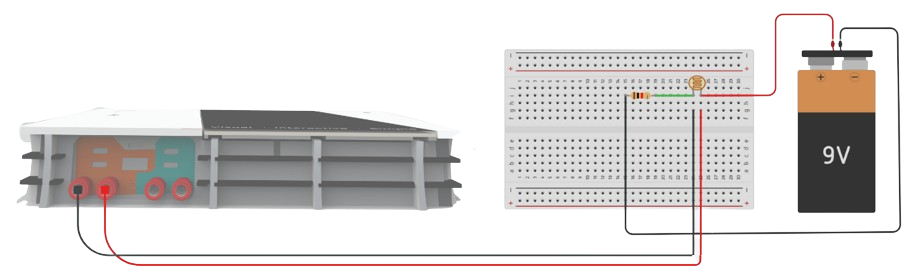
- Building and Testing Stage 1 (LDR + Resistor):
You may explain:
“First, let’s build the LDR and resistor circuit to see how light affects voltage.”
- Place the LDR on the breadboard.
- Connect one leg of the LDR to the positive terminal of the power source.
- Connect the other leg of the LDR to a 1kΩ resistor, then connect the other end of the resistor to ground.
- Connect the MeasureLab voltage probe in parallel with the LDR.
- Observe how voltage changes when you shine light on or cover the LDR.
- Observe what the current light intensity is using MeasureLab’s Light Sensor.
Recording Data (Stage 1):
| Light Condition | Light Intensity | Voltage (V) |
|---|---|---|
| Bright Light | ||
| Dim Light | ||
| Darkness |
Step 2: Adding the Buzzer
- Understanding the Brightness Trigger
You may ask:
“Now that we can measure light levels, how do we make something happen, like turning on a buzzer when it’s bright?”
Explain:
“We’ll add a buzzer to our circuit. The buzzer will only activate when the brightness level is high enough to create enough voltage. This level is like a brightness trigger.”
-
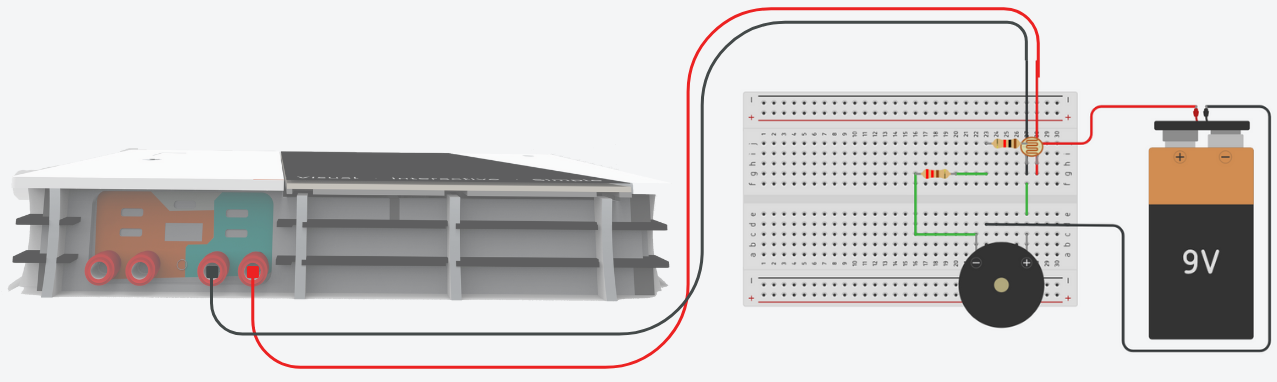
Connecting the Buzzer:
- Add the buzzer with a 220Ω resistor in parallel to the LDR.
- Test the circuit by shining light or covering the LDR.
- Observe when the buzzer turns on or off.
Step 3: Observing and Analyzing Voltage Changes in Real-Time
- You may ask:
“What happens to the voltage when the light around the LDR changes?”
-
Using MeasureLab to Record Voltage Changes:
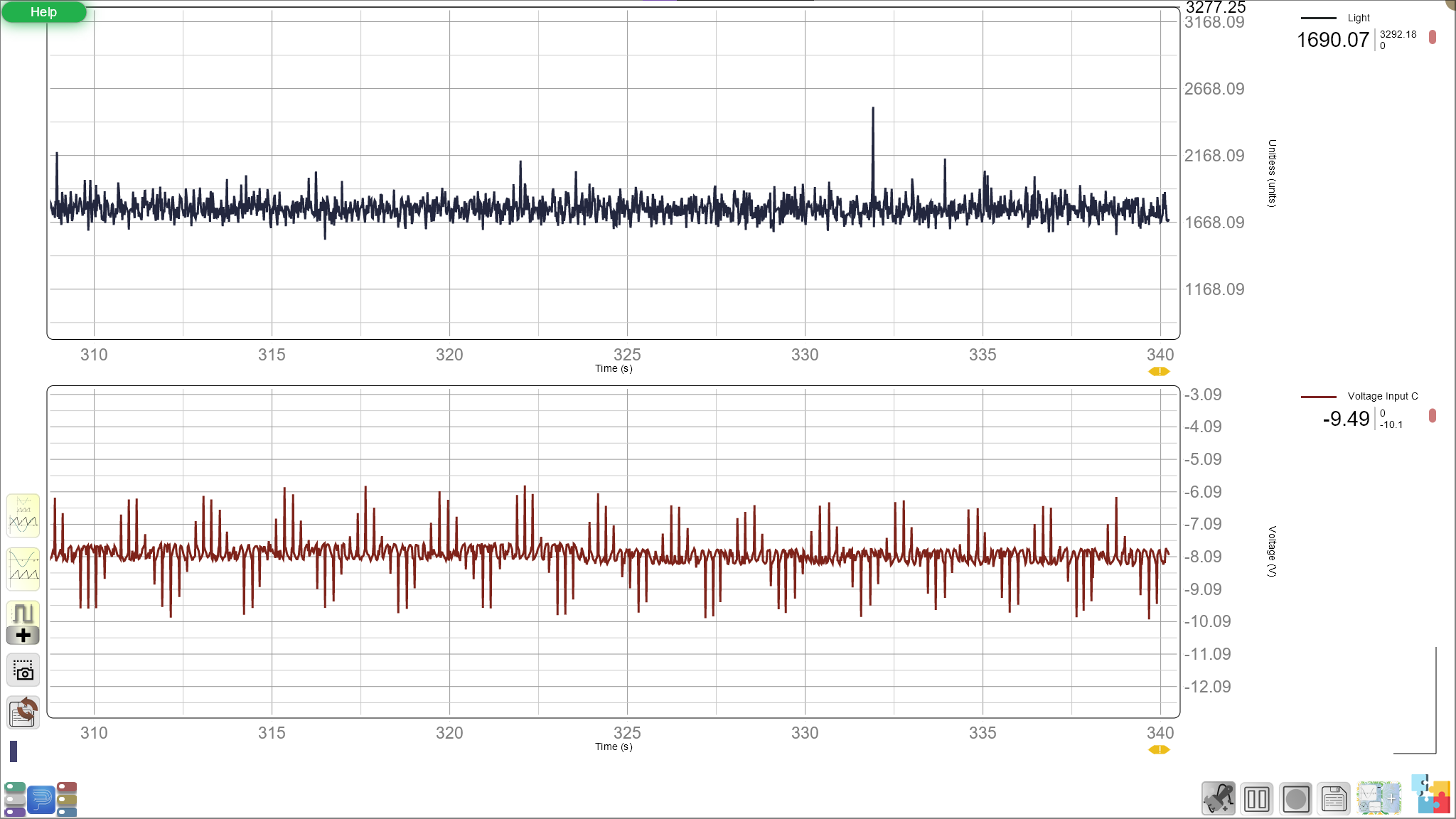
- Connect the voltage probe to MeasureLab to observe live voltage readings.
- Shine light and cover the LDR, recording voltage and buzzer status.
Recording Data (Stage 2):
Light Condition Light Intensity Voltage (V) Buzzer Status Bright Light On Dim Light Off Darkness Off
You main explain to the students what is actually happening in the circuit:
"Because the buzzer is connected in parallel to the LDR, the amount of voltage the buzzer receives depends on how much voltage is across the LDR. In bright light, the LDR’s resistance drops, causing more voltage to appear across it — and that’s when the buzzer gets enough power to turn on. In the dark, the LDR’s resistance increases, the voltage across it drops, and the buzzer doesn’t get enough power, so it stays off.
So essentially, this circuit is acting like a light-triggered switch. When light hits the LDR — like morning sunlight — it makes the buzzer sound, just like an alarm clock!"
Step 4: Exploring Real-World Applications and Discussion
-
Discussing Real-Life Uses
- You may ask:
“Where else could a light-activated alarm be useful? How does this type of system help in everyday life?”
-
Examples:
- Wake-up lights that activate with sunlight.
- Automatic streetlights.
- Light sensors in greenhouses for plant growth.
Guided Reflection and Discussion (10 minutes)
-
Analyzing Voltage and Buzzer Activation
- You may ask:
“What happened to the voltage when we changed the light around the LDR? How did this affect the buzzer?”
- Exploring Potential Improvements
You may ask:
“What changes could make this system better? Could it be more sensitive or work in more situations?”
- Summing Up
You may summarize:
“Today, we built a light-sensitive alarm that activates with increased light. By using a potential divider, we created a system that reacts to environmental changes.”
Glossary
- Light Dependent Resistor (LDR): A resistor that changes resistance based on light intensity.
- Potential Divider: A circuit that splits voltage between two components.
- Voltage: The electrical potential difference that changes based on light levels in this experiment.
- Resistance: The opposition to current flow, which changes with light in the LDR.
- Brightness Trigger: The specific level of brightness that turns the buzzer on or off.