Session 6: Navigating an Obstacle Course with Robots
Session Architect:
Duration: 45-55 minutes
Equipment Required:
- M3D Robotics kit.
- Laptops with Scratch pre-installed.
- Classroom objects (blocks, toys, etc.) to create an obstacle course.
- Paper and pencils for students to plan their obstacle course.
Learning Objectives:
- Apply coding concepts to navigate a robot through an obstacle course.
- Understand how to adjust the distance and direction of robot movement using code blocks.
- Develop teamwork and problem-solving skills through collaboration.
Resources:
Scratch Code File:
Grade 1 Session 6.sb3 (3.4 MB)
1. Introduction: Building on Movement Blocks (5 minutes)
Activity:
Introduce the session by relating it to the previous one, where students learned to move the robot with blocks. This time, they will use the same skills to navigate an obstacle course they create.
Instructions:
“Remember last time when we made our robot move using the blocks? Today, we’re going to make things a bit more challenging! You’re going to create your own obstacle course, and your robot will have to find its way through it!”
- Explain that they’ll use classroom objects like blocks and toys to build an obstacle course. After planning it out, they’ll program their robots to move through the course by adjusting the distance and direction.
Teacher’s Role:
- Encourage students to think about how they can use the same movement blocks they learned before (Move Forward, Turn Left, etc.) to move the robot through a course.
- Guide them as they brainstorm ideas for the obstacle course, helping them consider distance and direction.
2. Planning and Creating the Obstacle Course (10 minutes)
Activity:
Students will work together to design and build an obstacle course using classroom objects. They will plan out the course on paper before constructing it.
Instructions:
“First, let’s plan! Think about what objects you want to use and where you’ll put them. You can use blocks, toys, or anything else in the classroom to build your course.”
-
Hand out paper and pencils, and encourage students to sketch a simple map of their obstacle course, showing where the obstacles will go.
-
Once the plan is ready, students will gather materials and build the course.
Teacher’s Role:
- Facilitate the planning process, encouraging teamwork and collaboration.
- Offer suggestions or feedback on their designs, ensuring the course is challenging but doable for the robot.
3. Programming the Robot to Navigate the Course (20 minutes)
Activity:
Students will program their robots to move through the obstacle course, applying their knowledge of movement blocks.
Instructions:
“Now that your obstacle course is ready, it’s time to program the robot! Think about how far the robot needs to go, when it should turn, and how it will get through the obstacles.”
- Guide students to use the movement blocks (Move Forward, Turn Left, Turn Right) to program their robot. They will test their code by running the robot through the course.
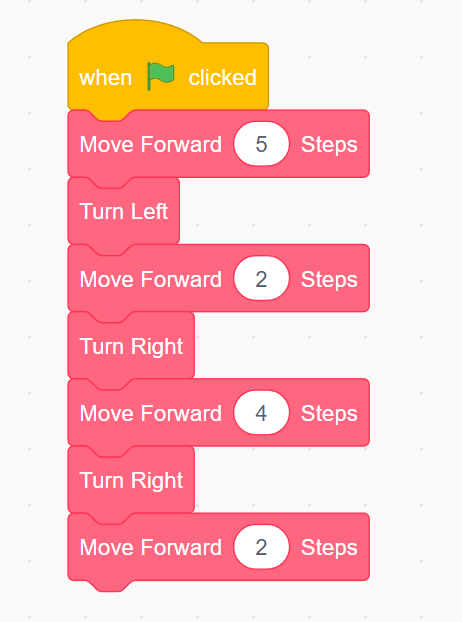
- “If your robot doesn’t make it all the way or hits an obstacle, don’t worry! You can go back to your code and make adjustments.”
Teacher’s Role:
- Assist students as they code the robot, offering help with adjusting the distance and direction.
- Encourage students to experiment with their code and make adjustments if the robot doesn’t navigate the course successfully.
4. Testing and Adjusting the Code (10 minutes)
Activity:
After testing their robot on the obstacle course, students will adjust their code if the robot doesn’t move as expected.
Instructions:
“If your robot didn’t make it through the course the first time, let’s take a look at what happened. Did it move too far? Or maybe it didn’t turn at the right spot? Let’s adjust the code and try again!”
- Allow students to revise their code to ensure the robot can navigate the course without hitting obstacles.
Teacher’s Role:
- Help students identify where they need to make changes in their code, focusing on distance and turning adjustments.
- Encourage persistence and problem-solving as students fine-tune their programs.
5. Adding Emotions with the “Express” Block (5 minutes)
Activity:
After completing the obstacle course, introduce the “Express” block to show how the robot can “feel” and display emotions on its screen, just like students feel excited when they finish something fun or challenging.
Instructions:
You can say:
“You know how excited you felt when your robot made it through the obstacle course? Well, your robot feels excited too. It was part of that journey and it can show its feelings too! Let’s give it an emoji to show how happy it is!”
- Show students how to use the “Express” block in Scratch to display different emojis on the robot’s screen, such as a smiling face, a loving face, or a happy face.
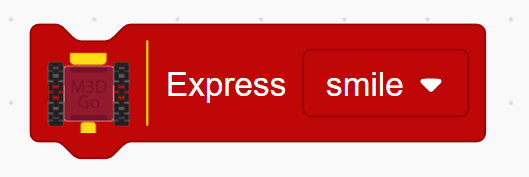
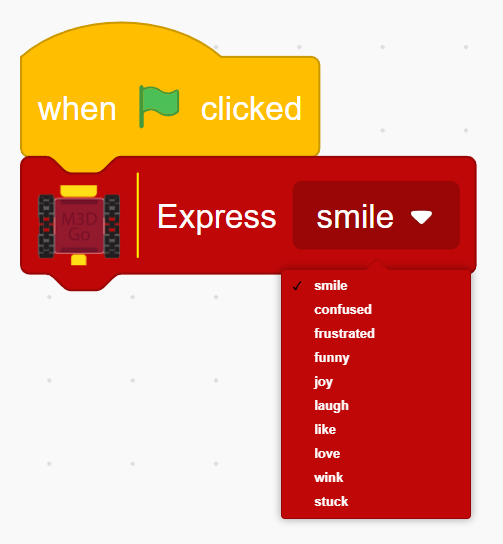
- Demonstrate how they can add the “Express” block at the end of their code so the robot shows a happy emoji when it finishes the obstacle course.
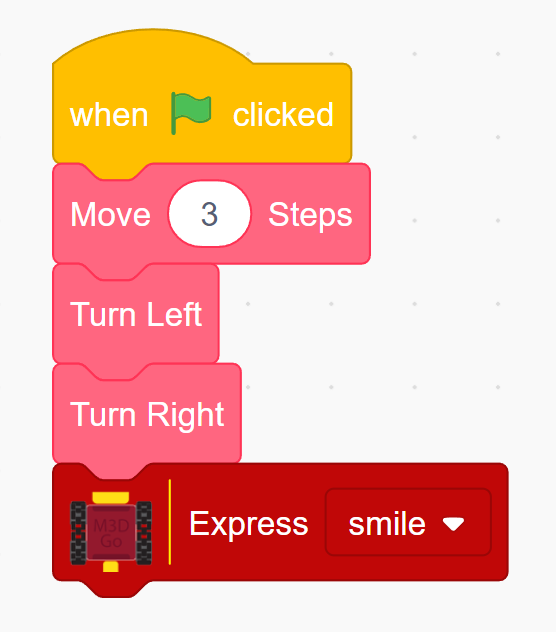
For example:
- Move Forward 3 steps
- Turn Left
- Turn Right
- Express: Smiling Face
Teacher’s Role:
- Guide students as they choose and add emojis to their robot’s code.
- Encourage creativity by asking students to try different emojis for different actions, making the robot’s journey more fun and expressive.
Learning Outcome:
By the end of the session, students will have applied movement and coding concepts to navigate an obstacle course. They will develop problem-solving skills by adjusting their code and gain experience working collaboratively to achieve a common goal.
6. Reflection and Wrap-Up (5 minutes)
Activity:
Gather the students together to reflect on their experience designing and navigating the obstacle course.
Reflection Questions:
- “What was the most fun part of designing the obstacle course?”
- “Was it easy or hard to get the robot through the course? What did you change in your code to make it work?”
- “What would you add to your obstacle course next time to make it even more fun?”
Teacher’s Role:
- Lead the reflection discussion, encouraging students to think about how they adjusted their code and how they might improve the course or their robot’s movements.
- Celebrate their creativity and problem-solving efforts, reinforcing the concepts they learned.
Learning Outcome:
By the end of the session, students will have applied movement and coding concepts to navigate an obstacle course. They will develop problem-solving skills by adjusting their code and gain experience working collaboratively to achieve a common goal.