Session 2: Exploring Shapes with the Robot
Session Architect: Muhammad Bilal
Session Length: 40 – 50 minutes
Learning Objective:
Students will be introduced to basic 2D shapes (square, circle, triangle) and will use the robot to draw these shapes by controlling its movement with arrow keys. They will identify and analyze the shapes’ sides and corners through a hands-on activity.
Equipment Required:
- Laptops with Scratch pre-installed
- M3D Go Robotics Kit
- Pre-marked grid or paper for the robot to draw shapes on
- Cut-out shapes for visual reference (squares, triangles, rectangles, circles)
Teaching Aids
Visual aids:
- Scratch running on a projector for better visual aid.
- Game pad program of scratch of the “M3D Go” next to the on-screen gamepad.
- Projector and screen (optional for the video demonstration).
Resources:
Scratch Code for the session:
Grade 2 Session 2.sb3 (3.5 MB)
Key Concepts:
- Understanding basic 2D shapes (sides and corners)
- Using the robot to trace 2D shapes by controlling its movement with arrow keys
- Observing and analyzing the shapes drawn
1. Drawing with the Robot (5-10 minutes)
Activity:
Start by attaching a marker or pen to the robot, allowing it to draw lines as it moves. Students will get a feel for controlling the robot’s movement using the arrow keys and drawing simple, random patterns.
Teacher’s Role:
You may start the session with a discussion:
“Have you ever seen a robot draw before? What do you think it will look like when we use it to draw?”
This encourages students to think about the task ahead. Next, you can ask,
“What do you think will happen when we press each arrow key?” This primes their thinking about how the robot will respond to their inputs.
Guide students as they begin:
“Let’s start by connecting the robot to the laptop and opening Scratch. Watch how each arrow key makes the robot move.”
Allow the students to experiment with the forward, backward, left, and right keys and observe how the robot moves across the paper or surface. Encourage them by saying,
“Try pressing the different arrow keys and see how the robot moves. What happens when you press the up arrow? What about the down arrow?”
Goal:
Help students develop basic control of the robot and introduce the idea of using movement to create drawings.
2. Introduction to 2D Shapes (10 minutes)
Activity:
Introduce the concept of 2D shapes (square, triangle, circle). Explain that these shapes are flat and have sides and corners. Use real-life examples (e.g., a book, a slice of pizza) to illustrate what 2D shapes look like.
Teacher’s Role:
You can begin by saying,
“Can you think of any objects around us that are made up of 2D shapes? What shapes can you see?” Allow students to brainstorm examples like windows, books, or pizza slices."
This helps them connect abstract shapes with real-world objects.
You can ask a question:
“Why do you think it’s important to know how many sides and corners a shape has?” This will help them understand why identifying shapes accurately is important in various tasks.
Hold up examples of different shapes and ask them questions like,
“How many sides does a triangle have?” or "What do you notice about the sides of a square?"
You may show some basic shapes on projector screen as well:
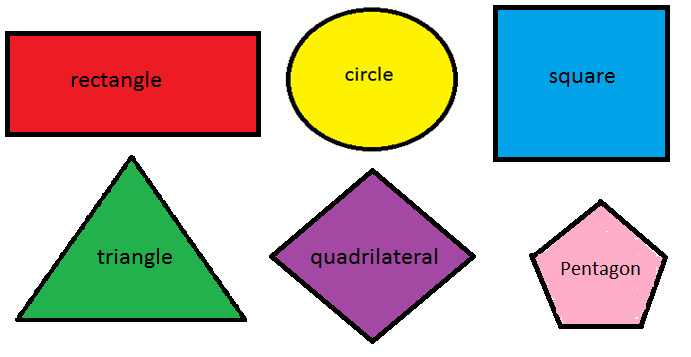
As students respond, reinforce the characteristics of the shapes—emphasizing that squares have four equal sides and triangles have three sides.
You can ask,
“What makes a square different from a rectangle?” This allows students to compare shapes and notice differences in sides and angles.
Finally, instruct the students to draw these shapes on paper. Encourage them to pay attention to the movements they make:
“For a square, first a straight line, then turn 90 degrees, and repeat.”
This will help them think about how their movements relate to the shapes they are drawing.
Goal:
Make sure students are familiar with the basic properties of 2D shapes before moving on to drawing them with the robot.
3. Drawing 2D Shapes with the Robot (15 minutes)
Activity:
Students will use the robot to draw basic 2D shapes (e.g., square, triangle). They will control the robot with arrow keys to trace the outlines of the shapes on paper or a large surface.
Teacher’s Role:
Start by saying,
“Let’s try drawing a square with the robot. What do you think we need to do for the robot to draw a straight line?”
This helps students focus on what is necessary for drawing accurate shapes. Then, demonstrate how to draw a square by moving the robot forward and turning it at right angles. As you demonstrate, you instruct as,
“For each side, the robot needs to move straight, then turn 90 degrees.”
Let the students take turns drawing shapes. As they work, say,
“Can you make a triangle? What do you need to do to make it have three sides?”
Encourage them to explore different shapes and try to replicate the movements needed for each one. As they work, offer guidance:
“Let’s make sure the robot turns sharp angles so the shape is accurate.” You may also prompt them with, “How do you know if your shape is correct? What do you look for?”
Goal:
Give students hands-on experience in controlling the robot to create recognizable shapes.
4. Shape Detective – Find the Missing Sides and Corners (10 minutes)
Activity:
After drawing the shapes with the robot, students will become “Shape Detectives.” They will inspect the shapes to find the “missing sides and corners” using fun detective tools like magnifying glasses (optional). This playful approach adds a sense of adventure and exploration.
Teacher’s Role:
Begin by saying,
“Sometimes robots don’t draw perfectly. Can you be a detective and find the missing sides and corners?”
Encourage students to investigate the shapes and count the sides and corners. As they work, ask,
“What do you look for when you examine the shape? How can you tell if it’s missing something?”
You can add a twist by saying,
“Some shapes may have a side missing. Can you figure out what went wrong and how to fix it?”
This allows students to think critically about how they can improve their drawings.
Goal:
Make the process of analyzing shapes fun while reinforcing students’ understanding of shape properties and drawing accuracy.
5. Conclusion and Reflection (5 minutes)
Activity:
Wrap up the session by reflecting on the shapes that were drawn and discussing what students found fun or challenging about using the robot to trace the shapes.
Teacher’s Role:
Ask the students,
“What was the most fun shape to draw?”
This opens the conversation for students to share their favorite parts of the activity. You can also ask,
“Which shape was the easiest or hardest to draw with the robot?”
This will prompt them to think about the challenges they faced. Finally, you can add a reflection question such as,
“How did controlling the robot help you learn more about shapes?” and “How accurate was the robot in drawing and writing?”
Conclude the lesson and summarize what they have done. You may say,
“Today you learned how to control the robot to draw shapes, and you became shape detectives! Next time, we’ll learn how to make the robot do even more interesting tasks!”