Session 8: “Group Collaboration: Building Scale Model Houses”
Architect:
Syed Shayaan Haider - Markhor3D
Learning Objectives
In this session, students will:
- Understand the concept of scale and how it’s used in modeling.
- Collaborate to design scaled household items to furnish a scale model house.
- Apply measurement and scaling skills to create accurate models.
- Begin designing furniture and items in TinkerCad, ensuring they are printer-friendly.
- Enhance teamwork and communication skills through group collaboration.
Teaching Aids
Required Equipment:
- Computers or tablets with TinkerCad access.
- Projector and screen for demonstrations.
- Rulers, measuring tapes, and calculators.
- Chart paper with the house floor plan at 1:25 scale (for class display).
- Tiled A4 sized prints for the floor plan of the house will be given. These will need to be pasted on the chart paper.
- Individual A4 copies of the floor plan for each student.
- Examples of scale models or images (e.g., dollhouse furniture).
- Whiteboard and markers for explanations.
- Printed idea sheets for students.
Visual Aids as Examples:
- Hotwheels Car 1:
- [Google Image Search “Scale model houses”]
- [Google Image Search “Scaled furniture”]
- [Google Image Search “Dollhouse furniture designs”]
Structure and Lesson Plan (Total Time: 50 minutes)
Introduction to Scale (5 minutes)
Encouragement:
“Today, we’re going to become architects and interior designers! We’ll learn how to create small versions of real-life objects to furnish a model house.”
Explain the Concept of Scale:
- Question: “Does anyone know what ‘scale’ means?”
- Explanation: “Scale is a way to make big things smaller so we can work with them easily. For example, if we want to make a model of a house, we can’t build it the same size as a real house, so we make a smaller version that’s exactly in proportion.”
Examples of Scaled Models:
Using Maps
Big Places on Small Paper
- Maps Show Big Areas Small: A map takes a large place like a city or a country and shows it on a small piece of paper.
- How Scale Works on Maps: If 1 inch on the map equals 1 mile in real life, that’s using scale.
- Why It’s Helpful: Scale lets us see and understand big places by making them small enough to look at easily.

Hot Wheels Cars
Tiny Cars That Look Real
- What Are Hot Wheels? Hot Wheels are small toy cars that look just like real cars but much smaller.
- Scaling Down Cars: The real car is made smaller so you can hold it in your hand. The scale for Hotwheel cars is 1:64.

Barbie Dolls
Small Dolls Like People
A Barbie doll is a toy that looks like a person but is much smaller.
- Scaling Down People: Barbie and her accessories are made smaller so you can play with them easily. Her scale is 1:6-
- Matching Accessories: Her clothes, house, and car are also scaled to fit her size.

2. Present the House Floor Plan (5 minutes)
Display the Floor Plan:
- Action: Unveil the chart paper with the house floor plan at 1:25 scale.
- Explanation: “This is our model house! It’s a smaller version of a real house.”
Distribute Individual Floor Plans:
- Action: Give each student an A4 copy of the floor plan.
- Question: “What rooms do you see in this house?”
Discuss the Rooms:
- Prompt: “Let’s think about what furniture and items we need for each room.”
Visual Aid:
- [Google Image Search “Simple house floor plan”]
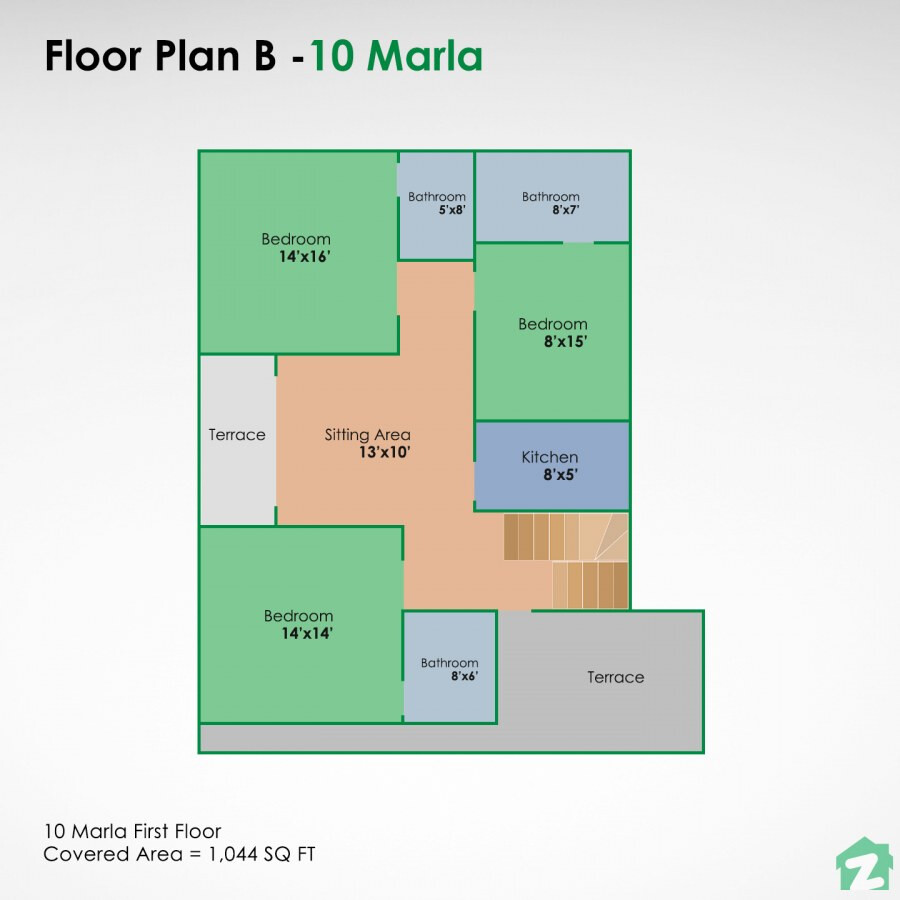
3. Group Formation and Task Division (5 minutes)
Form Small Groups:
- Action: Organize students into groups of 3-4.
Assign Rooms or Areas:
- Option: Assign each group a specific room (e.g., living room, bedroom, kitchen), or let them choose.
Task Division within Groups:
- Action: Have groups decide who will design which items.
- Suggestion: Encourage students to take on items they are excited about.
Encouragement:
“Working together, you’ll furnish your room with scaled-down furniture and decorations!”
4. Brainstorming and Scaling (10 minutes)
Measuring Real Objects:
- Question: “How big is a real sofa or bed?”
- Action: Discuss typical measurements of common household items.
Calculating Scaled Measurements:
- Explanation: “Since we’re using a 1:25 scale, we divide real measurements by 25.”
- Example:
- Real bed length: 80 inches ÷ 25 = 3.2 inches in our model.
- Action: Use calculators to compute scaled dimensions.
Recording Measurements:
- Action: Students write down the scaled dimensions of their items.
Sketching Designs:
- Prompt: “Draw your item with the scaled measurements on your floor plan.”
Encouragement:
“Make sure your furniture fits nicely in the room!”
5. Designing and Checking Printer Friendliness (30 minutes)
Review Key Concepts in TinkerCad:
- Action: Briefly revisit how to use basic shapes to create objects.
Designing in TinkerCad:
- Action: Students begin creating their items using the scaled dimensions.
Printer Friendliness Considerations:
- Question: “Are there any tiny parts that might be too small to print?”
- Explanation: “3D printers have limitations; very small or thin parts might not print well.”
Tips for Designing:
- Suggestion: Keep designs simple and avoid intricate details that are too small.
- Action Words:
- “Create the basic shape of your furniture.”
- “Adjust dimensions to match your scaled measurements.”
- “Combine shapes to add features.”
Checking Designs:
- Action: Walk around to assist students, ensuring designs are appropriate for printing.
Encouragement:
“Great job! Remember to double-check your measurements!”
6. Encourage Students to Measure at Home
Homework Assignment:
- Action: Ask students to measure a piece of furniture at home.
- Prompt: “Measure an item at home, like a chair or table, and calculate its scaled size for our model.”
- Suggestion: “Bring your measurements to the next class so we can add more items to our house!”
Closing Remarks:
“By measuring real objects, you can create even more accurate models!”
Glossary
I. Scale: A ratio that compares the measurements of a model to the real object.
II. Scale Model: A smaller or larger physical copy of an object that maintains the proportions of the original.
III. Measurement: Determining the size, length, or amount of something using standard units.
IV. Proportion: The relationship between dimensions of different parts of an object.
References and Teacher’s Guide
Examples of Household Items at 1:25 Scale (in mm)
- Dining Table
- Real Size: 1900 mm long, 1000 mm wide, 750 mm high.
- Scaled Size:
- Length: 1900 mm ÷ 25 = 76 mm
- Width: 1000 mm ÷ 25 = 40 mm
- Height: 750 mm ÷ 25 = 30 mm
- Chair
- Real Size: 900 mm high.
- Scaled Size:
- Height: 900 mm ÷ 25 = 36 mm
- Bed (Single/Twin Size)
- Real Size: 1900 mm long, 900 mm wide.
- Scaled Size:
- Length: 1900 mm ÷ 25 = 76 mm
- Width: 900 mm ÷ 25 = 36 mm
- Door
- Real Size: 2000 mm tall, 900 mm wide.
- Scaled Size:
- Height: 2000 mm ÷ 25 = 80 mm
- Width: 900 mm ÷ 25 = 36 mm
- Sofa
- Real Size: 2100 mm long, 900 mm deep.
- Scaled Size:
- Length: 2100 mm ÷ 25 = 84 mm
- Depth: 900 mm ÷ 25 = 36 mm
- Refrigerator
- Real Size: 1800 mm tall, 900 mm wide, 750 mm deep.
- Scaled Size:
- Height: 1800 mm ÷ 25 = 72 mm
- Width: 900 mm ÷ 25 = 36 mm
- Depth: 750 mm ÷ 25 = 30 mm
- Kitchen Countertop Height
- Real Size: 900 mm high.
- Scaled Size:
- Height: 900 mm ÷ 25 = 36 mm
- Television
- Real Size: 1270 mm wide.
- Scaled Size:
- Width: 1270 mm ÷ 25 = 50.8 mm
- Lamp
- Real Size: 450 mm tall.
- Scaled Size:
- Height: 450 mm ÷ 25 = 18 mm
- Bookshelf
- Real Size: 1500 mm tall, 750 mm wide.
- Scaled Size:
- Height: 1500 mm ÷ 25 = 60 mm
- Width: 750 mm ÷ 25 = 30 mm
Teacher’s Resources:
- Guide to TinkerCad (link to separate document)
- Guide to Cura (link to separate document)
- Getting Started with M3D Enabler (link to separate document)
- Tiled floor plan A4 sized (link to separate document)
Additional Notes for the Teacher
-
Visual Aids Accessibility:
- Have actual images or printouts of furniture designs to inspire students.
- Use physical models if available.
-
Examples and Questions:
- Example: “This is a model chair; see how it’s a smaller version but looks just like a real one?”
- Question: “How can we make sure our model furniture fits inside the rooms?”
-
Encourage Creativity:
-
Allow students to add simple decorations or unique features to their furniture.
-
Suggest they think about color and style, even if not reflected in the 3D print.
-
Use this opportunity to reinforce division and multiplication.
-
Question: “If a table is 40 inches long in real life, what is its length in our model?”
-
-
Printer Limitations:
THE CONCEPT OF SCALE DOES NOT NEED TO BE PERFECT! SOMETHINGS SHOULD BE KEPT OUT OF SCALE FOR STRENGTH
-
Explain the minimum size that can be printed to manage expectations.
-
Encourage designs that are sturdy and not too delicate.
-
Use of TinkerCad:
- Remind students to group shapes and save their work frequently.
- Tip: Show how to use the ruler tool in TinkerCad for precise measurements.
For suggestions, improvements, and corrections, feel free to reach out at shayaanhaider@gmail.com