Grade 5 - Session 3: “Measuring Speed and Acceleration”
Session Architect: Aleeza Ayaz - Markhor3D
Session Length: 50-60 minutes
Session Overview
In this session, students will explore the concepts of speed and acceleration through hands-on experimentation using photogate sensors. Working in groups, they will set up an inclined plane and use photogates to measure how long it takes for rolling objects to travel between two points. Students will calculate speed using the formula \text{Speed} = \text{Distance} \div \text{Time} and analyze how gravity affects acceleration. Through structured observation, data recording, and group discussions, students will relate their findings to real-world examples like biking, driving, or rollercoasters, understanding how gravity impacts motion and how acceleration reflects changes in speed over time.
Learning Objectives:
In this session, students will:
- Understand speed through hands-on experimentation using photogate sensors.
- Learn acceleration by observing how speed changes as objects roll down an inclined plane.
- Relate their understanding of speed and acceleration to gravity and motion.
- Understand how photogate sensors work and where they might have seen similar technology, including in movies or everyday life.
- Collaborate with group members to measure, calculate, and analyze data, relating it to real-life examples of motion.
Teacher Resource:
Session File: ML53.plf (61.1 KB)
Equipment Required:
- Photogate sensors (connected to MeasureLab for time data collection).
- An inclined plane (e.g., using clipboards).
- Rolling objects that touch the IR sensor (e.g., toy cars, large marbles, or balls).
- Measuring tape or ruler to measure the distance between photogates.
- Worksheets for recording data, performing calculations, and reflecting on findings.
- Pens, pencils, markers, etc.
Teaching Aids:
- Projector to show diagrams of how photogate sensors work (optional).
- Visual aids or animations explaining speed, acceleration, and gravity.
Introducing Speed and Acceleration with Hands-On Exploration:
Engaging Students with Everyday Examples:
You may start with a question that helps students relate to speed in their daily lives:
- You may ask:
“When you’re riding your bike or watching cars move, how do you know if something is moving fast or slow?”
-
Wait for students to share their thoughts before you respond. Depending on their responses, you could build the conversation by saying:
-
You may explain:
“That’s right! The faster something moves, the more distance it covers in a short time. This is what we call speed—it tells us how far something goes in a certain amount of time.”
Step 1: Measuring Speed with Photogate Sensors
Introducing Photogate Sensors:
You may begin by introducing photogate sensors and asking students if they’ve ever seen similar technology before:
You may ask:
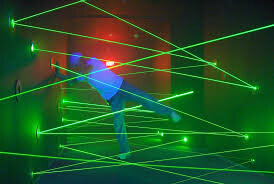
“Have you ever seen a spy movie where someone is sneaking through a room filled with laser beams? What happens when they break one of the beams?”
- After the students respond, you might explain:
You may explain:
“In those movies, breaking the beam sets off an alarm. Our photogate sensors work similarly, except they use an invisible light beam. When an object passes through the beam, the sensor records how long it took for the object to pass by.”
Real-Life Connection:
-
You may explain:
“You may have seen something like this when you walk into a store, and the doors automatically open because the sensor notices you’ve broken the beam. Today, we’ll use photogate sensors to measure how fast an object moves down a ramp.”
-
You may ask:
“What do you think will happen as the object rolls down the ramp? Will it move at the same speed, or will it change?”
-
Encourage students to discuss their predictions with group members and record them on their worksheets.
Setting Up the Experiment:
Preparing the Inclined Plane:
-
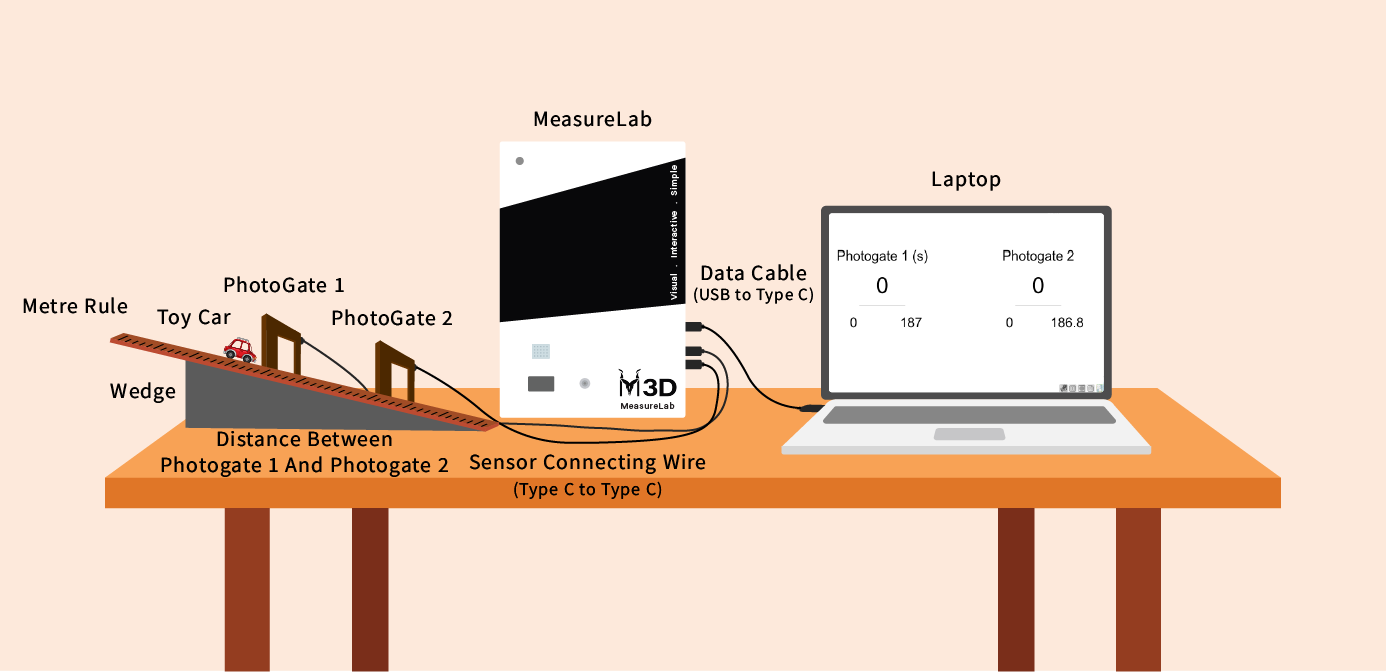
Have students set up the inclined plane with two photogate sensors at different points. They can work in their groups to measure the distance between the photogates and record it on their worksheets.
-
You may guide the students:
- You may say:
“Let’s measure the distance between the two photogates. This will help us calculate the speed of the object as it moves down the ramp.”
- You may say:
Rolling the Object and Collecting Data:
- Each group could roll an object down the ramp, starting just before the first photogate so the timer starts as the object passes through it. The photogate sensors will record the time it takes to pass through each one.
Recording Data:
Students will record data on the following:
- Distance between photogates: Measure in cm.
- Time to pass between photogates: Recorded by the photogates.
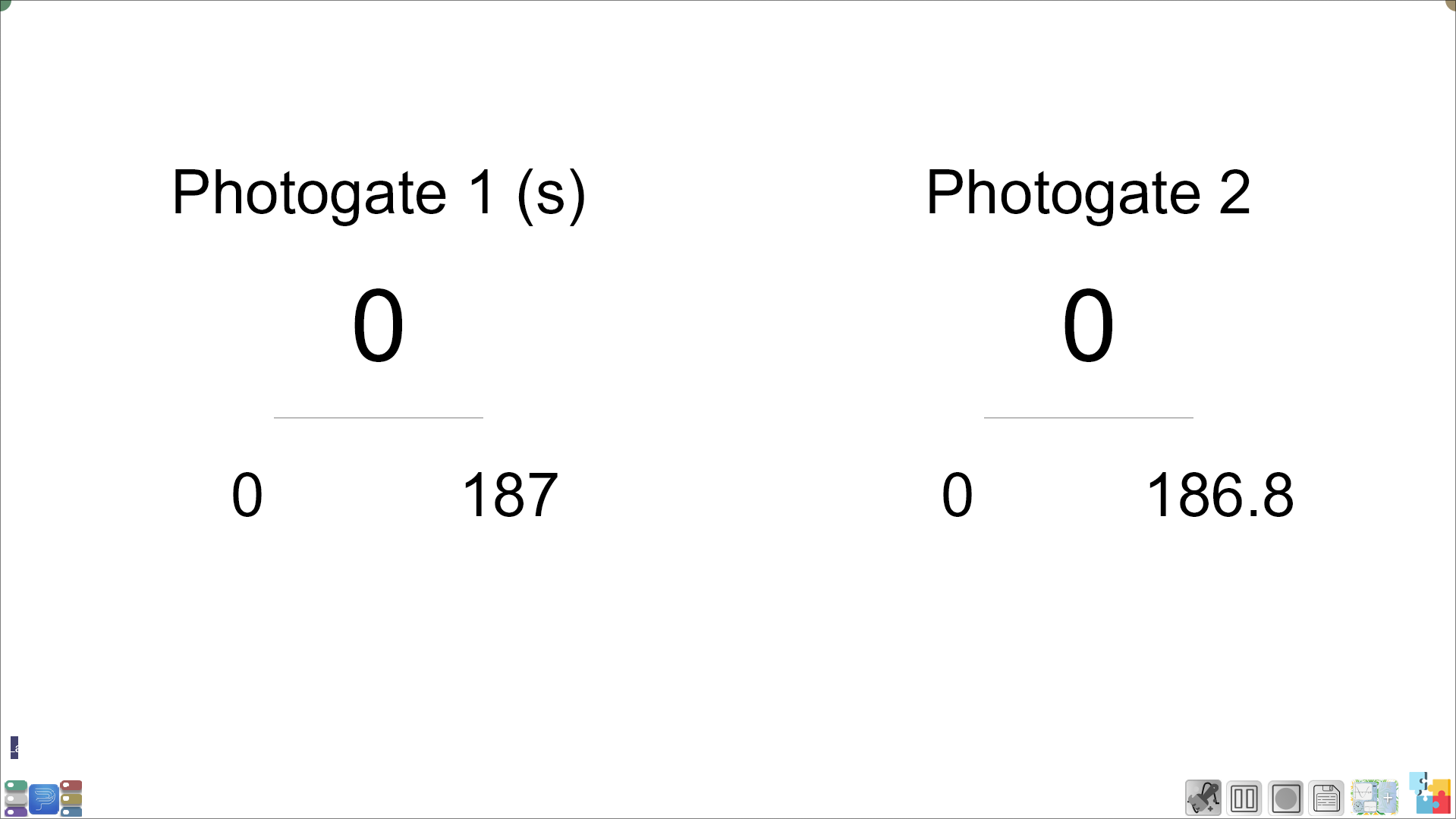
The time taken by the object to pass will be equal to the difference between Photogate 1 and Photogate 2 values.
Calculating Speed:
After the data is collected, guide students through the calculation of speed using the formula:
- Formula: Speed = Distance ÷ Time
Worksheet for Speed Calculation:
| Data | Formula/Explanation | Your Data/Answer |
|---|---|---|
| Distance between photogates | Measure the distance between the photogates in cm. | ______ cm |
| Time to pass between photogates | Time recorded as the object moves between the two photogates. | ______ seconds |
| Speed (cm/s) | Speed = Distance ÷ Time | ______ cm/s |
Group Discussion After Speed Calculation:
-
You may ask:
“What did you notice about the speed between the photogates? Did the object move faster, slower, or stay the same?”
-
You may guide the discussion:
“Sometimes objects speed up as they move. Now, we’re going to learn about what happens when an object changes its speed.”
Step 2: Introducing Acceleration (After Speed)
Explaining Acceleration:
-
You may explain:
“Now that we know how to measure speed, let’s talk about acceleration. Acceleration happens when an object’s speed changes—it either speeds up or slows down.”
-
You may ask:
“Can you think of an example where you’ve felt something accelerate?”
-
Students might mention things like cars speeding up or rollercoasters.
Connecting Acceleration to Gravity:
-
You may explain:
“What do you think causes the object to speed up as it rolls down the ramp? Why doesn’t it stay at the same speed?”
-
You may guide them:
“That’s right—gravity! Gravity pulls objects down, and that’s what causes them to accelerate as they move downhill.”
Calculating Acceleration Using Speed Data:
- You may explain:
“Acceleration = (Final Speed - Initial Speed) ÷ Time”
Worksheet for Acceleration Calculation:
| Data | Formula/Explanation | Your Data/Answer |
|---|---|---|
| Initial Speed | Speed is 0 at the first photogate. | 0 cm/s |
| Final Speed | Use the speed calculated between photogates. | ______ cm/s |
| Acceleration (cm/s²) | Acceleration = (Final Speed - Initial Speed) ÷ Time between photogates | ______ cm/s² |
Group Discussion After Acceleration Calculation:
-
You may ask:
“What did you observe about the object’s speed? Did it get faster as it rolled downhill?”
-
You may explain:
“That’s because gravity was pulling the object down, causing it to accelerate as it moved down the ramp.”
Reflection Questions on the Worksheet:
-
Did the object accelerate as it moved down the ramp?
-
Why do you think this happened?
-
How did the object’s speed change as it passed the second photogate?
-
How does gravity affect acceleration?
-
You may ask groups:
“How did your object’s speed change? Did gravity cause it to accelerate?”
Summary: (5-10 minutes):
-
You may summarize:
“Today, we learned how to measure speed and acceleration using photogate sensors. We saw that gravity made the object speed up as it moved down the ramp, and that’s called acceleration.” -
You may add a real-life connection:
“Remember, acceleration is everywhere—whether you’re driving, biking, or running. Anytime you speed up or slow down, you’re experiencing acceleration!”
Glossary:
- Speed: The distance an object travels in a given amount of time.
- Acceleration: The rate at which an object’s speed changes over time.
- Photogate Sensor: A device that measures the time it takes for an object to pass through a beam of light.
- Gravity: The force that pulls objects downward, causing them to accelerate when rolling down an inclined plane.
Next Session
Previous Session